The Boss BE7ACP is a popular in-dash multimedia receiver, and a blue screen — where the display shows nothing but a solid blue with no menu or content — is one of the more frustrating issues owners run into. The good news is that this problem is almost always software-related, not a sign of permanent hardware failure.
The blue screen on a Boss BE7ACP typically means the unit has lost its firmware, become stuck during a boot cycle, or experienced a software conflict. The fix in most cases involves performing a factory reset using the reset button on the unit, or re-flashing the firmware using a USB drive. Most owners can resolve this without professional help.
What the Blue Screen Actually Means on the BE7ACP
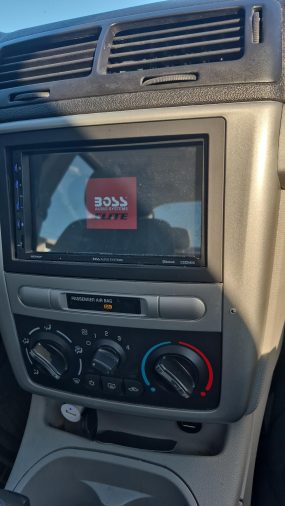
The Boss BE7ACP runs on an embedded Android-based operating system. When that OS fails to load correctly — due to a corrupted file, a bad update, power interruption, or memory issue — the unit stops short of reaching the main interface and gets stuck displaying a blue screen.
This is different from a unit that shows nothing at all (which would suggest a power or backlight hardware fault). A solid blue screen with no interface means the hardware is receiving power, but the software is failing to initialize properly.
Common Reasons This Happens
Several triggers can cause the blue screen on the BE7ACP:
- Interrupted firmware update — If the unit loses power or is turned off mid-update, the firmware can become corrupted
- Faulty USB device connected during startup — The unit sometimes attempts to read a connected USB at boot, causing a hang
- Corrupted internal storage — Like any Android device, internal memory issues can prevent normal booting
- Power supply problems — An inconsistent or low voltage supply (below 12V) can cause the unit to fail mid-boot repeatedly
- Factory reset needed after a software glitch — A crash that occurred while using apps or changing settings can leave the system in an unrecoverable state until reset
First Check: Power Supply and Wiring
Before touching the unit’s software, rule out a power delivery problem. The BE7ACP requires a clean, stable 12V supply from the vehicle. An undersized ground wire, corroded connection, or wiring harness issue can cause repeated boot failures that look exactly like a software problem.
Check the following:
- Confirm the yellow (constant 12V) and red (ACC/switched 12V) wires are connected correctly
- Verify the black ground wire is connected to a solid metal chassis ground, not a painted or rusty surface
- Use a multimeter to check voltage at the harness — you should see approximately 12–14V with the engine running
- Inspect the vehicle’s fuse for the head unit circuit
Only move to software troubleshooting after confirming the unit is receiving adequate power.
How to Perform a Factory Reset on the Boss BE7ACP
This is the most effective first fix for a blue screen caused by software issues.
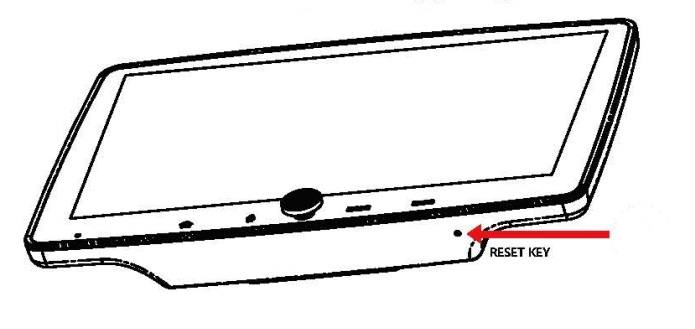
- Locate the reset pinhole — On the Boss BE7ACP, there is a small reset button recessed in a pinhole on the front panel or along the top edge of the unit (location may vary slightly by production batch — check the manual diagram)
- Use a straightened paperclip or SIM card ejection tool — Press and hold the reset button firmly
- Hold for 10–15 seconds — You may see the screen go dark, or it may flash before attempting a restart
- Release and wait — Allow the unit a full 60 seconds to complete the reboot cycle
- If the unit boots normally, proceed to set up your preferences; do not connect a USB immediately
- If the blue screen returns, the issue is likely firmware-related, and you’ll need to reflash
A factory reset erases stored settings, paired Bluetooth devices, and customized audio presets — but it does not affect the firmware itself.
Reflashing the Firmware via USB
If the factory reset does not clear the blue screen, reflashing the firmware is the next step. Boss Audio periodically releases firmware updates for the BE7ACP on their official support website.
- What you’ll need:
- A USB flash drive formatted to FAT32 (32GB or smaller works reliably)
- The correct firmware file downloaded from Boss Audio’s official website for the BE7ACP specifically
- A stable vehicle power source or a 12V power supply
Steps:
- Download the firmware update file from the Boss Audio support page — the filename will typically match the model number (BE7ACP)
- Extract the file if it comes in a ZIP archive and place the firmware file in the root directory of the USB drive (not inside any folder)
- With the head unit powered OFF, insert the USB drive into the front USB port
- Power on the unit — some firmware recovery modes launch automatically when a valid firmware file is detected at startup
- Follow any on-screen prompts; if a blue screen appears again, the unit may not be detecting the USB
- If there is no automatic detection, check the Boss BE7ACP manual or the firmware file’s included readme for the specific update procedure, which varies by firmware version
Critical: Do not remove the USB drive or disconnect vehicle power while the firmware is being written. This is what causes corruption in the first place.
When the USB Isn’t Being Recognized During Recovery
Some owners report the BE7ACP fails to detect a USB drive during recovery mode. If this happens:
- Try a different USB flash drive — older or lower-quality drives sometimes fail to initialize fast enough during boot
- Ensure the drive is formatted as FAT32, not exFAT or NTFS
- Keep the file in the root directory with the exact filename as specified by Boss Audio
- Try a smaller drive (8GB or 16GB) — very large drives occasionally cause read delays
- Remove any other USB devices or accessories from the vehicle before attempting
If the Reset and Reflash Don’t Work
In a small number of cases, the blue screen persists even after a proper reset and firmware reflash. This typically points to one of three scenarios:
- Hardware memory failure — The unit’s internal storage has physically failed, which is not user-serviceable
- Incorrect firmware applied — If the firmware file was not the exact correct version for the BE7ACP hardware revision, it can worsen the problem
- Touchscreen controller fault — Rarely, a faulty touch digitizer can interfere with the boot process in a way that looks like a software issue
If the unit is still within its warranty period, contact Boss Audio customer support directly before attempting any further disassembly. Boss Audio has a customer support line and warranty service process that may cover the unit at no cost.
Preventing the Blue Screen from Returning
Once the unit is working correctly again, a few habits can significantly reduce the chance of this problem coming back:
- Never disconnect power mid-update — If updating firmware, use a battery maintainer or keep the engine running
- Eject USB drives properly — Use the media player’s eject function before physically removing the drive
- Avoid leaving USB drives plugged in during startup — Unplug USB devices before turning on the vehicle if you’re not actively using them
- Check wiring periodically — Loose or corroded connections are a surprisingly common cause of repeated software failures on aftermarket head units
FAQ
Why does my Boss BE7ACP keep showing a blue screen after reset?
If the blue screen returns after a factory reset, the firmware is likely corrupted rather than just a settings issue. A reset clears preferences but not the operating system files. You’ll need to download and apply the correct firmware using a FAT32-formatted USB drive loaded with the official Boss Audio update file for the BE7ACP.
Can a bad ground cause the Boss BE7ACP blue screen issue?
Yes, a weak or corroded ground connection can cause voltage drops during boot that interrupt the startup sequence. In practice, this symptom often appears intermittently — the unit boots fine sometimes but gets stuck other times. Reconnecting the ground wire to a clean, bare metal point on the vehicle chassis often resolves it permanently.
Is it safe to drive with a blue screen on my head unit?
The vehicle itself is not unsafe to drive, but you’ll lose navigation, backup camera feed, and audio controls. If your vehicle relies on the head unit to display the rearview camera image, use extra caution reversing until the unit is repaired. Avoid attempting to repair or interact with the unit while the vehicle is moving.
What FAT32 USB drive size works best for Boss BE7ACP firmware updates?
A USB flash drive between 8GB and 32GB formatted to FAT32 is the most reliable choice for firmware recovery on the Boss BE7ACP. Drives larger than 64GB often use exFAT formatting by default and require manual reformatting. Avoid using drives that have been previously used for music libraries with complex folder structures.
How do I know if my Boss BE7ACP is bricked or just needs a firmware fix?
If the blue screen appears with no response to the reset button and the unit does not detect a USB drive during startup, there is a chance of deeper hardware or firmware failure. However, most cases that seem like a “bricked” unit are actually recoverable with the correct firmware file and proper USB setup. Contact Boss Audio support before assuming the unit is permanently damaged.
Does the Boss BE7ACP blue screen problem happen after a car battery replacement?
Yes, this is a commonly reported trigger. Replacing the car battery can cause a voltage spike or temporary power interruption that corrupts the head unit’s stored boot data. Performing a factory reset immediately after a battery replacement — before the unit develops a persistent boot failure — can prevent the issue from becoming a full blue screen problem.
Can I fix the Boss BE7ACP blue screen without a computer or USB drive?
The factory reset via the pinhole button does not require a computer or USB drive and should be the first step. If that clears the blue screen, no USB is needed. However, if the firmware itself is corrupted, a USB drive with the downloaded firmware is required. There is no over-the-air recovery option on the BE7ACP.
The Boss BE7ACP blue screen is almost always a software issue that responds to either a hard reset or a firmware reflash — not a reason to immediately replace the unit. Start with the pinhole reset, confirm power wiring is solid, and proceed to USB firmware recovery only if the reset fails. Most owners who follow these steps in order get the unit running again without professional help.