Finding a reliable dashcam that captures clear footage without emptying your wallet requires balancing essential features like resolution, night vision, and ease of installation against price. Budget dashcams have improved significantly, now offering 1080P to 4K recording, wide-angle lenses, and automatic loop recording at accessible price points. Whether you need front-only coverage for daily commuting, dual-camera protection for rideshare driving, or a three-channel system for comprehensive vehicle security, understanding which features matter most helps you avoid both overspending and choosing a camera that fails when you need it most.
At a Glance
Best for drivers who want maximum video detail and app-based file management without needing a built-in screen. This front-facing camera records in 4K resolution with a 160-degree wide angle, includes a 32GB memory card, and uses 5GHz WiFi for faster video downloads to your phone. The screen-free design keeps your windshield view unobstructed, while the F/1.6 aperture and WDR technology deliver clear night footage. Parking mode requires a separate hardwire kit.
Best budget option for rideshare drivers and parents who need simultaneous front and cabin recording. Both cameras capture 1080P video with a 170-degree front view, and the package includes a 32GB card. Simple suction cup mounting and cigarette lighter power make installation straightforward. The G-sensor automatically locks collision footage to prevent overwriting during loop recording.
Best for comprehensive coverage with front, rear, and interior monitoring. Records 1080P front with 720P cabin and rear views through a 170-degree front lens and 150-degree angles for inside and back cameras. The rear camera is waterproof for exterior mounting. Includes 32GB card, 5GHz WiFi app control, IPS screen, and 4 LED infrared lights for cabin night vision. Comes with a 24-month warranty and 24/7 support.
Best for drivers who prefer reviewing footage directly on the camera without phone apps. This front-facing camera records 2560×1440P resolution with a 3-inch IPS display and physical control buttons. The 170-degree lens and F1.8 aperture with WDR balance exposure in varied lighting. Features include suction cup mounting, Type-C power input, and detachable car charger. Memory card sold separately; supports 16GB to 128GB.
Best for buyers who already own a compatible memory card and want front-plus-cabin recording at the lowest entry price. Identical dual 1080P recording and 170-degree front coverage as the card-included version, with the same G-sensor protection, loop recording, and night vision. Requires purchasing a separate microSD card before use.
Quick Product Comparison
| Product | Resolution | Coverage | WiFi/App | Display | Card Included | Parking Mode |
|---|---|---|---|---|---|---|
| galphi 4K Dash Cam Front | 4K 2160P | Front only, 160° | 5GHz, Yes | No screen | 32GB | Yes (hardwire kit required) |
| 1080P Dual (with card) | 1080P front & inside | Front & cabin, 170° front | No | Not specified | 32GB | Not specified |
| 3 Channel Front Rear Inside | 1080P front, 720P rear & inside | Front 170°, rear & cabin 150° | 5GHz, Yes | IPS screen | 32GB | Yes (hardwire kit required) |
| iZEEKER 2.5K | 2.5K 1440P | Front only, 170° | No | 3″ IPS | No | Yes (hardwire kit required) |
| 1080P Dual (without card) | 1080P front & inside | Front & cabin, 170° front | No | Not specified | No | Not specified |
galphi 4K Dash Cam Front, 5GHz WiFi, 32GB Card Included, Mini

The galphi offers 4K front recording in a compact, screen-free design aimed at drivers who want high-resolution footage without dashboard clutter. Its 5GHz WiFi transfers video at up to 8MB/s, and it ships with a 32GB card pre-installed, eliminating the need for separate accessory purchases out of the box.
Verified Specifications
| Video Resolution | 4K UHD 2160P |
| Field of View | 160° |
| WiFi Standard | 5GHz |
| Included Storage | 32GB microSD card (pre-installed) |
| Maximum Supported Card Size | 256GB |
| Aperture | F/1.6 |
| Parking Mode | 24-hour time-lapse (requires hardwire kit, not included) |
Key Features and Practical Benefits
The 4K resolution delivers significantly more detail than 1080P alternatives, making license plates and road signs easier to read in recorded footage. The 160-degree wide angle covers multiple lanes without requiring extremely wide distortion correction.
The screen-free design reduces visual distractions and allows a smaller, more discreet footprint on your windshield. All playback and settings adjustments happen through the free companion app on your smartphone.
5GHz WiFi moves video files at four times the speed of older 2.4GHz systems, reducing wait time when you need to transfer footage for insurance claims or police reports. The manufacturer states download speeds reach 8MB/s compared to 2MB/s on 2.4GHz models.
The F/1.6 aperture combined with WDR technology improves low-light performance by capturing more light and balancing bright headlights against dark surroundings. This benefits night driving, rainy conditions, and tunnel transitions.
Loop recording automatically overwrites the oldest footage when the card fills, while the G-sensor locks important clips during sudden impacts or hard braking to prevent overwrite. You can also manually lock any moment by tapping the app.
Documented Advantages and Trade-Offs
The included 32GB card means immediate use without shopping for compatible storage, though the manufacturer notes this is a reduction from the previous 64GB inclusion due to memory chip cost pressures. For drivers who want extended recording time before loop overwrite, upgrading to a Class 10, U3, V30 card up to 256GB is supported.
The screen-free design trades instant on-device playback for lower distraction and a more compact form factor. You’ll need your phone nearby to review footage, which may be inconvenient for quick checks but keeps your focus forward while driving.
Parking mode offers 24-hour protection via time-lapse recording, but requires purchasing a separate Type C hardwire kit to tap into your vehicle’s fuse box. Without this accessory, parking monitoring is not available.
The single front camera provides no rear or cabin coverage, limiting visibility for rideshare drivers who may want interior recording or drivers concerned about rear-end collisions.
Who Should Consider It
This model suits drivers prioritizing front video quality and wanting to avoid add-on purchases for immediate functionality. The 4K resolution benefits anyone needing clear evidence for accident disputes or insurance claims.
Rideshare drivers who only need forward-facing recording will appreciate the discreet, distraction-free design and fast WiFi for quickly sharing footage with passengers or authorities.
New drivers and families looking for straightforward setup will benefit from the pre-installed card and simplified app-based operation, though the lack of a physical screen means a slight learning curve for those accustomed to traditional dashcam interfaces.
Setup and Everyday Use
The manufacturer states installation involves mounting the compact unit to the windshield and connecting the power cable. First-time users are noted to complete setup without difficulty following included instructions.
The camera powers on and begins recording automatically when your vehicle starts. All settings adjustments, video downloads, and live preview happen through the smartphone app paired via 5GHz WiFi.
For parking protection, you’ll need to source a compatible Type C hardwire kit and either install it yourself or have a professional tap into your fuse box. Once hardwired, the camera switches to low-power time-lapse mode when the vehicle is parked, capturing motion at reduced frame rates to conserve storage and battery.
1080P Dual Dash Camera for Car Front and Inside Dashcam Car Security Video Recorder,170°Wide Angle Vehicle Cam,WDR,G-Sensor,Loop Recording,Night Vision (Dual Dash Cam with 32G Card)

This dual-camera model records 1080P video simultaneously from the front windshield and inside the cabin, offering coverage for rideshare drivers, delivery drivers, and anyone wanting interior monitoring. It includes a 32GB card and uses a suction cup mount for straightforward installation.
Verified Specifications
| Video Resolution | 1080P (1920×1080) front and inside |
| Field of View | 170° |
| Included Storage | 32GB SD card |
| Mounting Method | Suction cup |
| Power Source | Cigarette lighter adapter |
Key Features and Practical Benefits
Dual recording provides two simultaneous 1080P video streams: one capturing the road ahead and one monitoring the cabin. This addresses the specific needs of rideshare and delivery drivers who want documentation of passenger or cargo behavior alongside road events.
The 170-degree front lens offers slightly wider coverage than the galphi’s 160-degree angle, potentially capturing more of adjacent lanes or sidewalk activity. The interior camera angle is not specified in the provided data.
The G-sensor automatically locks footage during collisions or sudden shakes, protecting critical clips from being overwritten during loop recording. This locked footage remains saved even when the SD card reaches capacity.
Night vision functionality is mentioned for both cameras, though specific aperture size and WDR implementation details are not provided in the listing data. The feature is designed to maintain usable footage in low-light conditions.
Loop recording starts automatically when the vehicle ignition turns on, continuously overwriting the oldest non-locked footage as the card fills. This maintains ongoing coverage without manual file management.
Documented Advantages and Trade-Offs
The interior camera directly addresses a gap in single-camera models, providing evidence of what happens inside the vehicle during incidents or disputes. For rideshare drivers, this can document passenger behavior; for personal use, it captures family road trips or provides evidence if a vehicle break-in occurs.
The suction cup mount offers tool-free installation and easy repositioning but may be less secure than adhesive mounts, especially in extreme heat or cold. The listing specifically advises cleaning the windshield thoroughly before mounting to ensure proper adhesion.
Power via cigarette lighter keeps installation simple and requires no hardwiring, but means the camera only operates when the vehicle is running unless you add a battery pack or hardwire kit separately. True 24-hour parking monitoring is not mentioned in the available features.
The 1080P resolution for both cameras is adequate for general documentation but captures less detail than higher-resolution single-camera models like the galphi’s 4K. License plates and small text may be harder to read, especially at distance or in challenging light.
Who Should Consider It
Rideshare and delivery drivers benefit most from dual recording, as the interior camera documents passenger interactions and provides protection against false claims or disputes.
Parents with new drivers may want cabin footage to review driving behavior and ensure phone-free focus on the road.
Budget-conscious buyers who want both interior and exterior coverage without purchasing separate cameras will find this configuration addresses both needs in a single package.
Setup and Everyday Use
Installation involves cleaning the windshield, pressing the suction cup mount firmly in place, and plugging the power cable into the vehicle’s cigarette lighter or accessory port. The listing notes this process is simple enough for first-time users.
Recording begins automatically when the vehicle starts. The camera manages loop recording and G-sensor event locking without driver intervention. Reviewing footage requires removing the SD card and using a card reader, as WiFi connectivity is not mentioned in the provided features.
The listing states suitability for various vehicle types including cars, trucks, buses, and farm equipment, suggesting robust enough construction for vibration and varied environments, though specific durability ratings are not provided.
Dash Cam Front and Rear
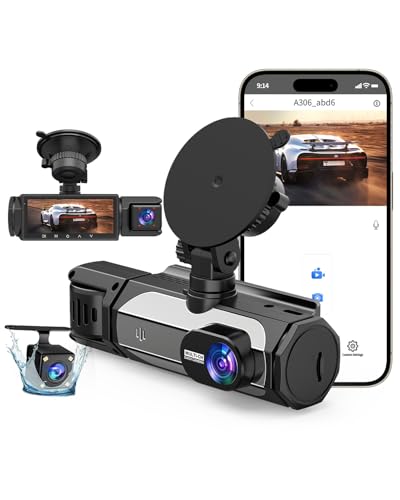
This three-camera system captures front, interior, and rear views simultaneously, making it a practical choice for rideshare drivers, families monitoring teen drivers, or anyone who wants comprehensive vehicle coverage. The 1080P front camera pairs with 720P interior and rear cameras to eliminate blind spots, while 5.8GHz WiFi enables fast video transfers directly to your phone. A pre-installed 32GB card means you can start recording immediately after installation.
Verified Specifications
| Front Camera Resolution | 1080P, 170° field of view |
| Interior Camera | 720P, 150° cabin view |
| Rear Camera | 720P, 150° waterproof |
| WiFi Standard | 5.8GHz with iOS and Android app |
| Memory Card | 32GB microSD included |
| Loop Recording | 1 or 3-minute intervals |
| Warranty | 24 months with 24/7 support |
Key Features and Practical Benefits
The triple-camera configuration addresses specific real-world scenarios: the front camera documents license plates and road signs, the interior lens records passenger activity or driver behavior for insurance purposes, and the waterproof rear camera captures tailgaters or parking lot incidents. The 170° front lens covers multiple lanes, while the 150° interior and rear angles provide adequate coverage without excessive distortion.
The 5.8GHz WiFi delivers noticeably faster file transfers than older 2.4GHz systems—the listing claims 4x speed improvement. You can preview live footage, download clips, or adjust sensitivity settings through the free app without removing the memory card, which streamlines sharing evidence with insurance companies or authorities after an incident.
Night performance relies on four LED infrared lights for interior recording and an F1.6 aperture paired with WDR (Wide Dynamic Range) technology for front and rear cameras. WDR balances bright headlights against dark shadows, addressing the common problem of washed-out footage when headlights dominate the frame.
Documented Advantages and Trade-Offs
The included 32GB card eliminates an immediate extra purchase, though serious users may want more storage—the system supports higher-capacity cards if you need longer recording windows before loop overwriting begins. The G-sensor automatically locks footage during collisions or hard braking, preventing important clips from being overwritten.
Twenty-four-hour parking mode requires purchasing a separate hardwire kit, which adds to the total cost. Without hardwiring, the camera won’t monitor your parked vehicle unless you leave your car’s accessory power on, which risks draining your battery. This is standard for parking mode across most dashcam brands, but it’s an important planning consideration.
The 720P resolution for interior and rear cameras is lower than the 1080P front camera. This is typical for multi-camera systems at this price point and still captures sufficient detail for most incidents, but it won’t match the clarity of dedicated single-camera units with higher rear resolution.
Who Should Consider It
Rideshare and delivery drivers benefit from interior cabin documentation, which can resolve passenger disputes or false accusations. Parents monitoring new drivers get complete visibility into both road conditions and in-car behavior. The rear camera also serves anyone frequently dealing with parking lot dings or backing incidents.
Budget-conscious buyers who want comprehensive coverage without buying separate front and rear units will appreciate the all-in-one approach. The included memory card and straightforward app-based management reduce setup friction for less technically inclined users.
Setup and Everyday Use
The listing emphasizes easy installation, typical of suction-mount or adhesive-mount dashcams that connect to your cigarette lighter. You’ll need to route the rear camera cable along the headliner and down the rear windshield, which takes more time than single-camera setups but doesn’t require professional installation for most vehicles.
Loop recording in 1- or 3-minute intervals means the camera continuously overwrites the oldest unlocked footage when the card fills. The G-sensor locks critical clips automatically, and you can manually lock any moment by pressing a button on the unit or through the app. Regularly transferring important footage to your phone or computer prevents accidental overwriting during extended trips.
iZEEKER 2.5K Dash Cam Front, 1440P QHD Car Camera with 3"
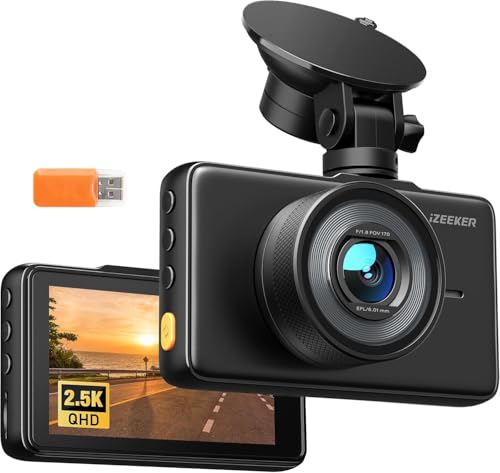
This single-lens front camera prioritizes video clarity with 2.5K QHD resolution (2560×1440P at 30fps), offering sharper detail than standard 1080P models for capturing license plates and road signs at greater distances. The 3″ IPS screen enables on-device playback without needing a phone connection, and physical buttons provide direct control while driving. It ships without a memory card, so plan to purchase one separately—the camera supports 16GB to 128GB microSD cards.
Verified Specifications
| Video Resolution | 2560×1440P (2.5K QHD) at 30fps |
| Field of View | 170° wide-angle |
| Screen Size | 3″ IPS display |
| Aperture | F1.8 with WDR |
| Memory Card Support | 16GB to 128GB microSD (not included) |
| Power Input | Type-C connection |
| Mounting | Suction cup included |
| Warranty | 2 years |
Key Features and Practical Benefits
The 2.5K resolution delivers approximately 78% more pixels than 1080P, which translates to clearer text on license plates and road signs, especially when zooming during playback. This extra clarity matters most during disputes where identifying a plate number or reading a street sign determines fault.
The built-in 3″ IPS screen sets this camera apart from screen-free models that require phone apps for all interactions. You can review footage immediately after an incident without pairing devices or waiting for WiFi transfers—particularly useful when speaking with police or exchanging information with other drivers. Physical buttons allow you to lock recordings, adjust settings, or navigate menus without touchscreen delays or app dependencies.
Night performance relies on an F1.8 aperture that captures more light than smaller apertures, combined with WDR to balance bright headlights and dark surroundings. This setup addresses common low-light challenges like blown-out highlights from oncoming traffic or underexposed shadows on dimly lit streets.
Documented Advantages and Trade-Offs
The higher resolution provides a meaningful advantage for evidence documentation, but it consumes more storage space per minute of footage compared to 1080P cameras. A 64GB card will give you less total recording time before loop overwriting begins, so budget for a larger card if you take long trips or want extended parking mode coverage.
The camera automatically powers on and off with your vehicle’s ignition, and loop recording overwrites the oldest unprotected files when storage fills. The G-sensor locks footage during sudden impacts or hard braking, and you can manually lock clips with the physical button anytime you witness something noteworthy.
Parking mode offers two approaches: standard motion-triggered recording that captures and locks footage when it detects shakes or collisions, and time-lapse mode that records continuously at a reduced frame rate to save space during extended parking. Both require a separate hardwire kit, which is standard across the industry but adds cost and installation complexity.
The Type-C power input provides a modern, reversible connection, and the detachable car charger offers flexibility—you can use the included cigarette lighter adapter or connect to a USB port. Suction cup mounting works well for renters or people who move the camera between vehicles, though adhesive mounts provide more permanent stability if you prefer.
Who Should Consider It
Drivers who prioritize video clarity over multi-angle coverage will appreciate the 2.5K resolution, especially if you frequently drive in dense traffic or urban environments where capturing license plates at distance matters. The integrated screen appeals to users who want immediate playback without relying on phone battery or app connectivity.
This camera suits anyone who prefers tactile buttons over touchscreens or app-only controls, particularly drivers wearing gloves or those who want to adjust settings quickly while on the road. The front-only coverage works well for commuters and highway drivers whose primary concern is documenting what happens ahead of their vehicle.
Setup and Everyday Use
Installation follows the standard dashcam process: mount the camera behind your rearview mirror, route the power cable along the headliner and A-pillar to keep it tidy, and plug into your cigarette lighter or hardwire for parking mode. The suction mount allows quick repositioning or removal, though you’ll need to clean the windshield thoroughly for reliable adhesion.
Remember to purchase a memory card before installation—the camera won’t record without one. Choose a card rated for continuous recording (Class 10, U3, or V30 minimum) to prevent write errors or corrupted files during long sessions. Format the card in the camera before first use to ensure compatibility.
Loop recording in customizable intervals means you don’t need to manually delete old footage. Check the screen periodically to confirm the camera is recording and hasn’t encountered a card error. The manual lock button gives you one-touch protection for important clips, preventing them from being overwritten until you transfer or delete them intentionally.
1080P Dual Dash Camera for Car Front and Inside Dashcam Car Security Video Recorder,170°Wide Angle Vehicle Cam,WDR,G-Sensor,Loop Recording,Night Vision (Dual Dash Cam Without Card)
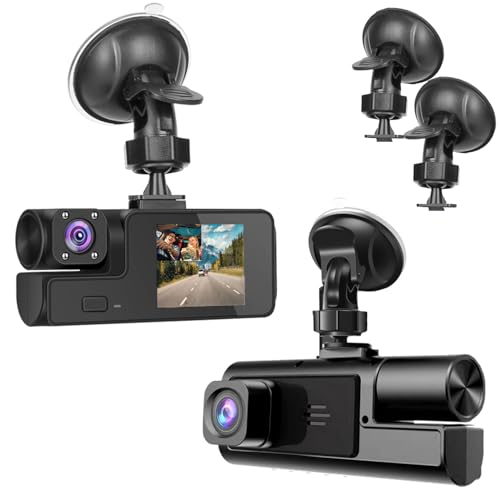
This budget dual-camera dashcam records both the road ahead and the vehicle interior simultaneously at 1080P resolution, making it a practical option for rideshare drivers, families monitoring new drivers, or anyone wanting cabin coverage alongside forward recording. The 170-degree wide-angle front lens captures multiple lanes, while the interior camera documents passenger activity and cabin events. As the product title indicates, this version ships without a memory card, so you’ll need to purchase a compatible microSD card separately before first use.
Key Features and Practical Benefits
The simultaneous front and interior recording distinguishes this camera from single-lens models in the budget category. Both cameras capture 1920×1080P video, providing sufficient detail to read license plates in good lighting conditions and document cabin interactions. The 170-degree front lens angle covers typically three to four traffic lanes, reducing blind spots compared to narrower field-of-view cameras.
The built-in G-sensor automatically detects sudden impacts or sharp braking and locks the corresponding video file to prevent loop recording from overwriting it. This event-triggered protection ensures collision footage remains available even if the memory card fills completely during an extended trip. The night vision sensor activates in low-light conditions to improve cabin and forward visibility after dark, though performance depends heavily on ambient street lighting and headlight illumination.
Loop recording starts automatically when the vehicle ignition turns on, continuously overwriting the oldest unlocked footage once the SD card reaches capacity. This eliminates manual file management for routine driving. WDR (Wide Dynamic Range) technology helps balance exposure when recording scenes with both bright and dark areas simultaneously, such as tunnel exits or oncoming headlights at night.
Documented Advantages and Trade-Offs
The dual-camera configuration at this price point represents the primary value proposition, offering interior monitoring that single front-facing budget cameras cannot provide. Rideshare and delivery drivers particularly benefit from documentation of passenger behavior and package handling inside the vehicle. The suction cup windshield mount and cigarette lighter power connection enable installation without tools or permanent modification to the vehicle.
However, this model ships without a memory card, requiring an additional purchase before the camera becomes operational. Buyers should budget for a Class 10 or higher microSD card with at least 32GB capacity; higher-endurance cards rated for continuous recording extend lifespan. The listing does not specify parking mode capability or mention a hardwire kit option, suggesting the camera only records when the vehicle runs and the cigarette lighter socket supplies power.
The 1080P resolution on both cameras represents baseline adequate quality rather than premium clarity. While sufficient for general documentation, fine details like distant license plates or small text may not resolve as sharply as 2.5K or 4K models. The camera lacks WiFi connectivity, requiring users to remove the SD card and use a card reader to review footage on a computer or phone—a less convenient workflow than app-based systems.
Who Should Consider It
This dashcam suits budget-conscious buyers who specifically need dual front-and-interior recording and already own or plan to purchase a compatible memory card. Rideshare drivers operating for Uber, Lyft, or delivery services gain documentation of both road incidents and passenger interactions. Parents monitoring teen drivers, fleet operators tracking employee behavior, or anyone wanting comprehensive vehicle surveillance will find the dual-camera setup addresses needs that single-lens cameras cannot.
Buyers prioritizing the highest video quality, WiFi convenience, or parking surveillance should compare models with those specific features. This camera targets users willing to trade advanced capabilities and included accessories for a lower entry price with dual-camera coverage.
Setup and Everyday Use
Installation follows the standard budget dashcam process: clean the windshield area where the suction cup will mount, position the front camera behind the rearview mirror to minimize windshield obstruction, and route the power cable to the cigarette lighter socket. The interior camera typically mounts on the front housing and should angle toward the cabin. Before first use, insert a formatted microSD card (Class 10 or faster, 16GB to 128GB capacity recommended for dashcam applications).
The camera powers on automatically when the vehicle starts and begins loop recording. During normal operation, no interaction is required unless you want to manually lock a specific video segment—check if the camera includes a physical lock button for this purpose. To review footage, power off the camera, remove the SD card, and use a computer or card reader. Periodically format the card using the camera’s menu system to maintain performance and prevent file corruption. Check that the suction mount remains secure, especially in extreme heat or cold, and ensure the lenses stay clean for optimal video quality.
Detailed Buying Guide for Best Cheap Dashcam
Shopping for an affordable dashcam means balancing essential features against your budget. The right model depends on how you drive, where you park, and what kind of coverage matters most when something goes wrong.
Video Resolution and Image Quality
Resolution determines whether you can read a license plate or identify a face in your footage. Budget dashcams typically offer 1080P, which captures clear video in good lighting and remains adequate for most insurance claims. Higher-resolution options like 2.5K or 4K deliver sharper detail—especially useful for zooming into distant plates or reading street signs—but they also consume more storage space and may cost slightly more.
Night vision capability matters more than resolution in low-light conditions. Look for models with larger apertures (F1.6 or F1.8) and Wide Dynamic Range (WDR) technology, which balances bright headlights against dark surroundings. A 1080P camera with strong night vision often outperforms a 4K model with poor low-light performance when you need it most.
Field of View and Camera Coverage
A wider viewing angle captures more of the road and adjacent lanes. Most budget dashcams offer 160° to 170° horizontal coverage, which records activity in neighboring lanes and helps document side-impact incidents. Ultra-wide lenses can introduce slight distortion at the edges, but the tradeoff is worthwhile for comprehensive front coverage.
Single front-facing cameras cost least and suit drivers who mainly want evidence of what happens ahead. Dual-channel models add an interior or rear camera, making them ideal for rideshare drivers, parents monitoring teen drivers, or anyone parking in high-traffic areas. Three-channel systems provide front, rear, and cabin recording but push the upper edge of the “cheap” category. If you’re interested in how cabin cameras function in different contexts, understanding how cameras inside cars work can clarify what to expect from interior monitoring features.
Storage and Loop Recording
Dashcams rely on microSD cards to store footage. Budget models typically support 32GB to 128GB cards, with some accepting up to 256GB. A 32GB card stores roughly three to five hours of 1080P footage or one to two hours of 4K recording before the loop overwrites old files. Larger cards extend that window, which becomes important if you drive long distances between reviews.
Loop recording automatically deletes the oldest unprotected clips when the card fills up, ensuring continuous operation without manual file management. Check that the camera supports Class 10, U3, or V30-rated cards—slower cards cause dropped frames and recording gaps. Some manufacturers include a card; others require separate purchase.
G-Sensor and Parking Mode
The G-sensor detects sudden acceleration, hard braking, or collisions and immediately locks the current video file so loop recording won’t overwrite it. This feature is standard on nearly all dashcams and essential for preserving accident evidence. Sensitivity adjustment lets you fine-tune how much motion triggers a lock—useful for avoiding false positives from potholes or speed bumps.
Parking mode monitors your vehicle when the engine is off. Motion-detection parking mode activates recording only when the camera senses movement, conserving power and storage. Time-lapse parking mode captures footage at a reduced frame rate, creating a continuous but condensed record. Both options require either a battery pack or a hardwire kit that connects the camera to your car’s fuse box, and hardwire kits typically cost an additional $15 to $30. Budget dashcams rarely include the hardwire kit, so factor that into your total cost if 24-hour monitoring matters.
Screen Versus Screenless Design
Built-in screens let you review footage, adjust settings, and confirm camera angle without pulling out your phone. A 2.5-inch to 3-inch display adds convenience for quick checks and setup but increases the camera’s size and power draw. Physical buttons alongside the screen simplify menu navigation while driving.
Screenless models rely entirely on smartphone apps for playback and configuration, which keeps the camera compact and less distracting on your windshield. WiFi-enabled dashcams connect to your phone for wireless video downloads and live preview. Older 2.4GHz WiFi transfers files slowly; newer 5GHz systems move data up to four times faster, cutting wait time when you need to share footage quickly. If you prefer minimal windshield clutter and don’t need instant on-device playback, a screenless model saves money and mounting space.
Power and Installation Compatibility
Most budget dashcams draw power through a cigarette lighter adapter or USB port, making them easy to install without professional help. Type-C power inputs are becoming standard and offer more reliable connections than older micro-USB ports. Detachable power cables let you route wiring cleanly along the windshield edge and A-pillar, hiding cords from view.
Check cable length before buying—short cables may not reach your power outlet if you mount the camera high on the windshield. Some models include adhesive mounts; others use suction cups. Adhesive mounts hold more securely in extreme temperatures but are harder to reposition. Suction cups allow easy removal and angle adjustment but may lose grip in very hot or cold weather.
Installation, Assembly and First-Time Setup
Installing a dashcam requires no special tools and typically takes fifteen to thirty minutes. Start by cleaning the windshield area where you’ll mount the camera—use glass cleaner and let it dry completely so the adhesive or suction cup bonds properly. Position the camera behind your rearview mirror to keep it out of your line of sight and minimize distraction.
Most dashcams mount with either an adhesive pad or a suction cup. Peel the backing off an adhesive mount, align the camera so the lens points straight ahead and sits level with the horizon, then press firmly for ten to fifteen seconds. Suction mounts twist or lock into place; make sure the cup flattens completely against the glass before securing the locking mechanism. Adjust the angle so the camera captures the road ahead without recording too much hood or sky—aim for about one-third sky and two-thirds road in the frame.
Route the power cable along the top edge of the windshield, tucking it behind the headliner trim, then down the A-pillar on the passenger side. Use plastic trim tools or your fingers to gently push the cable into the gap between the windshield and interior panels—avoid forcing it near airbag deployment zones. Run the cable under the dashboard to the cigarette lighter or USB port. Excess cable can be coiled and secured with twist ties or adhesive clips to keep it tidy.
Insert the microSD card into the camera’s card slot before connecting power—some models won’t recognize a card inserted while powered on. Plug the power cable into the camera and then into your car’s outlet. The dashcam should power on automatically when you start the engine. Follow the on-screen prompts or app instructions to set the date, time, video resolution, and loop recording interval. Test the camera by driving around the block and reviewing the footage to confirm focus, angle, and that audio recording works if desired.
For models with parking mode, decide whether to install a hardwire kit or rely on battery power. Hardwiring connects the dashcam directly to your vehicle’s fuse box, allowing it to draw power when the engine is off without draining your car battery. This installation is more complex and may require a professional if you’re unfamiliar with automotive electrical systems. Always refer to the manufacturer’s manual for model-specific wiring diagrams and fuse ratings.
Maintenance and Common Troubleshooting
Dashcams require minimal maintenance but benefit from a few regular checks. Clean the lens every few weeks with a microfiber cloth to remove dust, smudges, and road grime that degrade video quality. Avoid harsh chemicals or paper towels, which can scratch the lens coating. Check that the camera remains firmly mounted—temperature swings and vibration can loosen adhesive or suction mounts over time.
Format your microSD card every four to six weeks using the camera’s built-in format function, not your computer. Repeated loop recording wears out cards, and formatting clears corrupted files that cause recording errors. Replace the card every twelve to eighteen months or sooner if you notice stuttering video, missing clips, or error messages. Always use cards rated for continuous recording—standard SD cards fail quickly under constant write cycles.
If the camera stops recording, first check that the card isn’t full and that loop recording is enabled in settings. Verify the power cable is securely connected at both ends and inspect it for damage. Cameras that won’t power on may have a blown fuse in the power adapter—check the fuse and replace it with the correct amperage rating. Overheating can trigger automatic shutdowns in extreme heat; shade your windshield when parked or relocate the camera slightly away from direct sunlight.
Blurry or washed-out footage at night usually indicates a dirty lens or incorrect exposure settings. WDR or night mode should be enabled for low-light driving. If WiFi connection fails, restart both the camera and your phone, ensure you’re within range, and verify the app has the latest update. Persistent problems often resolve with a factory reset, but back up important footage first since resetting erases custom settings and may clear the card.
Frequently Asked Questions
Do cheap dashcams work well at night?
Budget dashcams with larger apertures (F1.6 or F1.8) and WDR technology perform well in low light, capturing clear footage of headlights, taillights, and license plates. Models without these features produce grainy, overexposed video after dark. Night performance varies widely at this price point, so prioritize specifications over resolution alone.
Can I use a dashcam without a memory card included?
Some budget models ship without a memory card to reduce cost, requiring you to purchase one separately. Always buy a high-endurance card rated Class 10, U3, or V30 to handle continuous recording. Using a standard card leads to dropped frames and premature card failure.
How much footage can a 32GB card store?
A 32GB card holds approximately three to five hours of 1080P video or one to two hours of 4K footage before loop recording overwrites the oldest files. Locked files from G-sensor events won’t be overwritten, so periodically transfer or delete them to free space.
Do I need professional installation for parking mode?
Parking mode with a battery pack requires no installation beyond normal setup. Hardwired parking mode connects to your vehicle’s fuse box and may need professional installation if you’re uncomfortable working with car electrical systems. Installation kits are sold separately and typically cost $15 to $30.
Will a dashcam drain my car battery?
Dashcams powered through the cigarette lighter turn off when you remove the key, so they won’t drain the battery. Hardwired parking mode draws minimal power and includes low-voltage cutoff protection to prevent battery drain, but extended parking monitoring in older vehicles with weak batteries may still cause issues.
Can I move my dashcam between multiple vehicles?
Yes, dashcams with suction mounts transfer easily between cars—just remove the mount, clean both surfaces, and reattach. Adhesive mounts are harder to relocate without damaging the pad. Screenless models and compact designs make vehicle switching more convenient than bulkier cameras with large displays.
How do I know if my dashcam is recording?
Most dashcams display a blinking LED or on-screen icon while recording. Models with screens show a recording indicator and elapsed time. Screenless cameras typically have a small status light near the lens. Check your camera’s manual for specific indicators.
What’s the difference between 5GHz and 2.4GHz WiFi in dashcams?
5GHz WiFi transfers video files up to four times faster than 2.4GHz, reducing the time needed to download clips to your phone. If you frequently share footage or review recordings, the faster connection saves frustration. For occasional use, 2.4GHz remains functional but slower.
Final Verdict
The best cheap dashcam balances resolution, essential safety features, and ease of use without stretching your budget. Models with 1080P or better resolution, strong night vision, included memory cards, and reliable G-sensor protection deliver the core functionality most drivers need. Whether you choose a compact screenless design or a model with a built-in display depends on how often you review footage and your preference for windshield real estate. Prioritize proven features over marketing claims, and verify that the camera includes or supports the accessories you need—especially memory cards and hardwire kits for parking mode—before completing your purchase.