If your car came with wired CarPlay or Android Auto but you’re tired of plugging in your phone every drive, a wireless adapter offers a straightforward fix. These compact dongles convert your factory system to wireless operation without replacing your head unit or losing access to your original touchscreen and controls. Most current adapters support both iPhone and Android devices, work with vehicles from 2016 onward, and reconnect automatically when you start the car. Choosing the right one depends on connection speed, build quality, compatibility with your specific vehicle make, and whether you need features like multi-phone switching or optimized heat dissipation for long trips.
At a Glance
Aluminum construction with both USB-A and USB-C support, one-press switching between two paired phones, and automatic reconnection on ignition. From the makers of the bestselling AirFly Bluetooth adapter line, engineered to stay cool and maintain stable wireless links without dropped connections.
5GHz WiFi with Bluetooth 4.2 and fast reconnect in 5 seconds after initial 10-second connection. 50% smaller than typical adapters with dual USB-A and Type-C ports, rigorously tested for 50,000+ plug cycles. Multi-device switching for families sharing vehicles. Not compatible with BMW or Tesla.
Metal casing with acrylic glass surface designed for stable signal transmission on bumpy roads. FCC-certified with free lifetime firmware updates to optimize connection speed and fix bugs. Three-step setup with auto-reconnect function; covers 98% of factory-installed CarPlay systems for iOS 10 or later.
Dual-band 2.4GHz and 5GHz WiFi for responsive wireless performance with optimized heat dissipation design for extended use. OTA firmware updates to maintain compatibility as iOS and Android systems evolve. Supports iPhone iOS 10+ and Android 11+ in vehicles with factory-wired systems from 2016 onward.
Bluetooth 5.3 with WiFi 5.8GHz transmission and gold-plated USB connector for steady data transfer. Designed to reduce loose-port interruptions during highway driving and uneven roads. No app or subscription required; preserves original car touchscreen, steering wheel buttons, and voice assistant access. Not compatible with Tesla or BMW.
Quick Product Comparison
| Product | WiFi Technology | Bluetooth Version | USB Ports | Multi-Phone Switching | Heat Management |
|---|---|---|---|---|---|
| Twelve South AirFly Drive | Not specified | Not specified | USB-A & USB-C | One-press two-phone | Engineered to stay cool |
| Ottocast Mini Cube 3.0 | 5GHz WiFi | Bluetooth 4.2 | USB-A & Type-C | Multi-device sharing | Not specified |
| Yizro 2026 | Not specified | Not specified | USB port (type not detailed) | Not specified | Metal casing design |
| Wireless 2-in-1 Dongle | 2.4GHz & 5GHz dual-band | Not specified | USB-A & USB-C | Not specified | Optimized heat dissipation |
| Mini Gold-Plated Adapter | WiFi 5.8GHz | Bluetooth 5.3 | USB-C/A | Not specified | Not specified |
Twelve South AirFly Drive Wireless CarPlay & Android Auto Adapter, Black

The Twelve South AirFly Drive enters the wireless CarPlay adapter market backed by the brand’s established reputation in Bluetooth audio accessories. This aluminum-bodied adapter is designed to convert factory-wired CarPlay and Android Auto systems into wireless connections while supporting both USB-A and USB-C ports. The inclusion of one-press two-phone switching makes it particularly relevant for households where multiple drivers share a vehicle.
Key Features and Practical Benefits
The AirFly Drive supports both factory-wired CarPlay and Android Auto systems, meaning iPhone users and Android phone owners can both use it without needing separate adapters. The dual USB-A and USB-C compatibility addresses a practical issue many drivers face when upgrading vehicles or using rentals—you won’t need to carry extra dongles or adapters to match your car’s USB port configuration.
The aluminum construction serves both aesthetic and functional purposes. Metal housings typically dissipate heat more effectively than plastic alternatives, which the manufacturer specifically highlights as engineered to “stay cool and maintain a stable wireless link.” Overheating is a documented concern with wireless CarPlay adapters that rely on WiFi and Bluetooth simultaneously, so a design prioritizing thermal management addresses a real-world problem.
One-press two-phone switching is a standout feature for multi-driver households. Rather than unpairing one device and manually reconnecting another each time drivers change, the adapter maintains memory of two paired phones and allows quick toggling. This streamlines the experience for couples, families with teenage drivers, or anyone who regularly shares their vehicle.
The plug-and-leave design means you connect it once to your car’s USB port and it remains installed. There’s no app requirement or recurring setup—the adapter handles automatic reconnection when you start your ignition. Twelve South promises ongoing compatibility updates, though the listing doesn’t specify whether these are delivered over-the-air or require manual intervention.
Documented Advantages and Trade-Offs
Twelve South’s track record with the original AirFly Bluetooth adapter series—which the listing identifies as the “#1 bestselling bluetooth adapter on Amazon”—suggests established supply chains, customer support infrastructure, and firmware development experience. This brand recognition may translate to more reliable long-term support compared to newer entrants in the wireless CarPlay adapter category.
The compact, clutter-free design keeps cable management simple, but the listing doesn’t provide exact dimensions or specify whether the adapter protrudes significantly from the USB port. In vehicles where the USB port sits in a tight console area or behind a cover, physical fit can become a practical concern.
The adapter works with “most factory-wired CarPlay/Android Auto vehicles,” but “most” isn’t quantified with a specific compatibility percentage. Unlike some competitors that claim 98% compatibility and explicitly list BMW and Tesla as exceptions, the AirFly Drive listing doesn’t detail vehicle exclusions. Buyers with less common vehicle brands or older factory head units should verify compatibility before purchase.
There’s no mention of dual-band WiFi specifications, connection speed benchmarks, or latency measurements. While the listing emphasizes a “stable wireless link” and “smooth audio and maps without dropped connections,” these are design goals rather than quantified performance metrics.
Who Should Consider It
The AirFly Drive makes the most sense for households with two primary drivers who both need regular wireless CarPlay or Android Auto access. The one-press switching feature specifically targets this scenario, eliminating the friction of constant re-pairing.
iPhone and Android households will appreciate the true cross-platform support. Some wireless adapters prioritize CarPlay and treat Android Auto as a secondary feature, but Twelve South positions both as equally supported.
Buyers who prioritize brand reputation and established customer support may lean toward Twelve South over unfamiliar brands. If you’ve used AirFly products for airplane or gym Bluetooth audio, you’ll recognize the design language and support ecosystem.
Setup and Everyday Use
The adapter follows the standard wireless CarPlay setup sequence: plug it into your car’s wired CarPlay USB port, enable Bluetooth and WiFi on your phone, and pair through your vehicle’s existing CarPlay interface. After initial pairing, the automatic reconnection feature should activate whenever you start your car.
For two-phone households, both devices complete the initial pairing process once. The one-press switching mechanism (presumably through the adapter itself or your vehicle’s existing interface, though the listing doesn’t specify the exact button location) then allows quick toggling between the two paired phones without going through full setup again.
Because the adapter remains plugged into your USB port permanently, you won’t need to fish it out of a glovebox or center console each drive. The trade-off is one occupied USB port—relevant if your vehicle has limited USB ports and you need to charge devices or connect other accessories simultaneously.
Ottocast Mini Cube 3.0 Wireless CarPlay & Android Auto Adapter 2026–
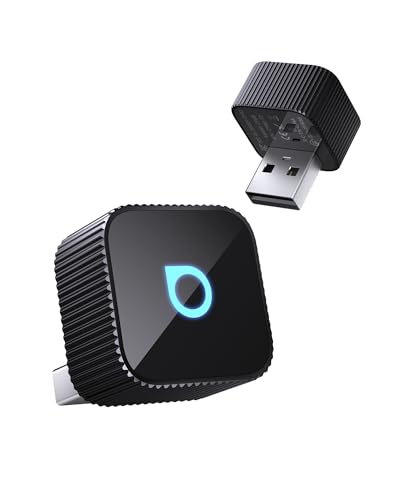
The Ottocast Mini Cube 3.0 positions itself as a fast-connecting wireless CarPlay and Android Auto adapter with specific attention to size, durability, and multi-device switching. The manufacturer provides concrete technical specifications—5GHz WiFi, Bluetooth 4.2, and a “next-gen chip”—alongside quantified connection speed claims. The explicit exclusion of BMW and Tesla vehicles addresses compatibility questions upfront, while the 98% compatibility claim gives buyers a clearer picture of expected vehicle coverage.
Verified Specifications
| Wireless Technology | 5GHz WiFi + Bluetooth 4.2 |
| Initial Connection Time | 10 seconds (claimed) |
| Auto-Reconnect Time | 5 seconds (claimed) |
| USB Port Support | Dual USB-A & Type-C ports included |
| Size Comparison | 50% smaller than typical adapters (claimed) |
| Durability Testing | 50,000+ plug cycles tested (claimed) |
| Vehicle Compatibility | 98% of wired CarPlay/Android Auto vehicles; not for BMW/Tesla |
Key Features and Practical Benefits
The 5GHz WiFi specification matters for wireless CarPlay performance. Higher-frequency WiFi bands typically offer faster data transmission and reduced latency compared to 2.4GHz-only adapters, which translates to more responsive map rendering and smoother audio streaming. The Bluetooth 4.2 component handles the initial handshake and maintains the control connection between your phone and the adapter.
Ottocast provides specific connection time claims: 10 seconds for initial connection and 5 seconds for auto-reconnect on subsequent drives. These are faster than many competitors and, if accurate in real-world use, meaningfully reduce the wait time between starting your ignition and having functional navigation or audio. However, these are manufacturer claims rather than independently verified measurements.
The 50% size reduction claim positions the Mini Cube 3.0 as a compact option that won’t protrude awkwardly from your dashboard. In vehicles with recessed USB ports or limited console space, a smaller adapter reduces the chance of accidental disconnection from bumping into it with your knee or center console items.
The dual USB-A and Type-C port inclusion means you receive physical port adapters or a cable compatible with both standards. This matters because vehicle manufacturers transitioned from USB-A to USB-C at different times, and even within a single model year, different trim levels may have different port types.
Multi-device switching allows parents, couples, or friends sharing a vehicle to use their respective phones without complex re-pairing. The listing doesn’t specify whether this is automatic detection or requires manual selection, but the feature addresses a common frustration point.
Documented Advantages and Trade-Offs
The 50,000+ plug cycle durability testing suggests Ottocast has specifically engineered the USB connector to withstand repeated insertion and removal. While most buyers will plug in the adapter and leave it connected, this durability claim is relevant for people who move the adapter between multiple vehicles or temporarily remove it when lending their car.
The explicit BMW and Tesla exclusion provides useful clarity. Both manufacturers use proprietary implementations of CarPlay and Android Auto that often don’t work with third-party wireless adapters. By stating this upfront, Ottocast helps buyers avoid purchasing an incompatible product.
The “CD-quality sound—10x better than Bluetooth” claim requires context. Wireless CarPlay transmits audio using AAC encoding over WiFi, which is higher quality than standard Bluetooth SBC codec. However, “10x better” is marketing language rather than a technical audio measurement. The practical takeaway is that audio quality should match or exceed what you experience with a wired CarPlay connection.
The three-step setup process—plug in, enable Bluetooth/WiFi, pair your phone—is standard for wireless CarPlay adapters. No app requirement simplifies the experience and eliminates potential software compatibility issues as iOS and Android versions update.
The Bluetooth 4.2 specification is somewhat dated compared to Bluetooth 5.0 or 5.3 found in newer adapters. Bluetooth 4.2 provides sufficient bandwidth for CarPlay control signals, but newer Bluetooth versions offer improved connection stability and range. For most users in a vehicle environment, this won’t cause noticeable issues, but it’s worth noting when comparing technical specifications.
Who Should Consider It
Drivers who prioritize fast connection times will appreciate the claimed 5-second auto-reconnect. If you make frequent short trips where you’re only in the car for 10–15 minutes, faster connection means more of your drive time has functional navigation and audio.
The compact size makes this adapter suitable for vehicles with tight console layouts or for drivers who prefer minimal visual clutter on their dashboard. The 50% size reduction claim suggests it will sit nearly flush with the USB port rather than protruding noticeably.
Families or couples sharing a vehicle benefit from the multi-device switching feature. Rather than one person always needing to connect or disconnect, both drivers maintain paired profiles.
Long-term durability matters for commuters putting significant annual mileage on their vehicles. The 50,000-plug-cycle testing suggests the adapter is built for extended use, though most users will plug it in once and leave it connected.
Buyers with BMW or Tesla vehicles should look elsewhere—the listing explicitly excludes these brands due to their proprietary CarPlay implementations.
Setup and Everyday Use
Initial setup follows the standard wireless CarPlay procedure. Plug the Ottocast adapter into your vehicle’s factory-wired CarPlay USB port using the appropriate USB-A or Type-C connector. Enable Bluetooth and WiFi on your phone, then select the Ottocast adapter from your vehicle’s CarPlay interface. After the initial pairing, the adapter should remember your phone and automatically reconnect when you start your car.
The 5-second auto-reconnect claim means you should have functional CarPlay shortly after your engine starts, rather than waiting 15–30 seconds as with some slower adapters. Real-world performance will depend on your specific vehicle’s head unit speed and your phone model, but the underlying WiFi and Bluetooth specifications support fast connection times.
For multi-device scenarios, both phones complete the initial pairing process. The listing doesn’t specify whether the adapter automatically detects which phone is present and connects to it, or whether you manually select between paired devices through your car’s interface. This detail would be important to understand from the product manual or user experience reports.
The compact design means the adapter should fit in most factory USB port locations without blocking adjacent ports or interfering with nearby controls. If your vehicle has USB ports in a recessed area or behind a sliding cover, verify that the adapter dimensions allow the cover to close fully.
Yizro 2026 Wireless CarPlay Adapter for iPhone & Android Device
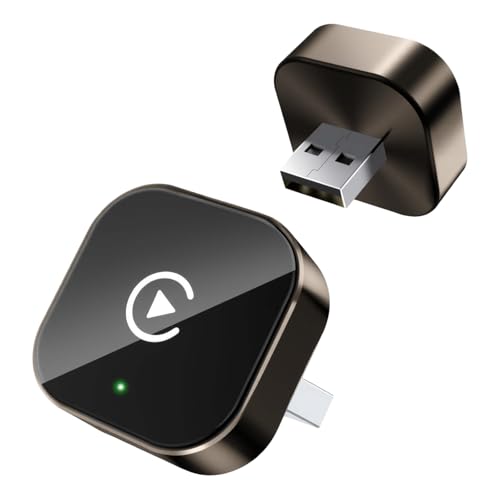
The Yizro wireless adapter converts factory-wired CarPlay systems to wireless operation, focusing on iPhone compatibility with iOS 10 or later. The listing describes a compact metal-and-acrylic design built for durability and signal stability. FCC certification and lifetime firmware updates are highlighted for ongoing compatibility and safety.
Key Features and Practical Benefits
The adapter’s compact form factor keeps the USB port area uncluttered, which matters in vehicles with limited space around the center console. Metal casing with an acrylic glass surface is described as scratch-resistant, addressing concerns about wear from repeated plugging and unplugging or exposure to dashboard heat. The tight-fit structural design aims to maintain consistent contact even on rough roads, which can help prevent mid-drive disconnections that interrupt navigation or calls.
Auto-reconnect functionality eliminates the need to manually pair your iPhone each time you start the car. After the initial three-step setup—plug in, enable Bluetooth and WiFi, then pair—the adapter is designed to link automatically when the ignition turns on. This saves time during quick errands or daily commutes where you’re getting in and out frequently.
Lifetime firmware updates delivered by the manufacturer can address iOS changes that occasionally disrupt third-party CarPlay adapters. FCC certification indicates the adapter meets radio frequency interference standards, which is particularly important for avoiding conflicts with your car’s existing wireless systems like tire pressure monitors or key fobs.
Documented Advantages and Trade-Offs
The minimalist design integrates cleanly into most car interiors without drawing attention. The adapter preserves all original CarPlay functions—navigation, music streaming, Siri voice commands, hands-free calling, and messaging—so you’re not sacrificing features for the convenience of wireless operation.
Compatibility is limited to factory-wired CarPlay vehicles, which means aftermarket head units or cars without any CarPlay system won’t work. The listing specifies iOS 10 or later for iPhones but does not provide detailed Android specifications beyond mentioning Android device support in the title. Buyers with Android phones should verify compatibility before purchase, as the feature list emphasizes iPhone and CarPlay rather than Android Auto.
The adapter does not include dual USB ports like some competitors, so you’ll use either the existing USB-A or USB-C port in your vehicle. If your car has only one data port and you need to charge a second device simultaneously, you may need a separate charging solution.
Who Should Consider It
This adapter suits iPhone users with factory-wired CarPlay who want to eliminate the daily cable routine. It’s practical for drivers who frequently enter and exit their vehicle throughout the day—parents doing school drop-offs, delivery drivers, or sales professionals making multiple stops. The durable construction is designed for long-term use in vehicles that see regular driving on varied road conditions.
Drivers who value a clean aesthetic will appreciate the compact design that doesn’t add visual clutter. The FCC certification and lifetime update commitment provide reassurance for buyers concerned about long-term reliability and keeping pace with iOS updates.
Avoid this adapter if your vehicle uses an aftermarket head unit, lacks factory CarPlay, or if you primarily use an Android phone and need confirmed Android Auto support with detailed specifications.
Setup and Everyday Use
Initial setup involves connecting the adapter to your car’s USB data port, enabling Bluetooth and WiFi on your iPhone, and completing the pairing process. After this one-time configuration, the adapter is designed to reconnect automatically each time you start your car, typically within a few seconds of turning the ignition.
During daily use, the adapter operates in the background without requiring app management or manual intervention. Your iPhone stays in your pocket or bag, and all CarPlay functions appear on your car’s built-in display as they would with a wired connection. Steering wheel controls, touchscreen inputs, and voice commands continue to work through your car’s original interface.
For firmware updates, follow the manufacturer’s instructions when updates become available. Keeping firmware current helps maintain compatibility as Apple releases new iOS versions throughout the year.
Wireless CarPlay Adapter & Android Auto Adapter

This 2-in-1 adapter adds wireless functionality to vehicles equipped with factory-wired CarPlay or Android Auto systems. Dual-band WiFi operating on both 2.4GHz and 5GHz frequencies is designed to deliver responsive performance for navigation, streaming, and hands-free communication. OTA firmware updates aim to maintain compatibility as smartphone operating systems evolve.
Verified Specifications
| WiFi Bands | 2.4GHz and 5GHz dual-band |
| iOS Compatibility | iPhone with iOS 10 or later |
| Android Compatibility | Android phones with Android 11 or later |
| Port Compatibility | USB-A and USB-C |
| Vehicle Year Range | 2016 and newer with factory-wired systems |
Key Features and Practical Benefits
Dual-band WiFi support distinguishes this adapter from single-band models that operate only on 2.4GHz. The 5GHz band typically offers faster data transmission and less congestion from other devices, which can reduce latency during navigation updates or music streaming. The 2.4GHz band provides a fallback option if your phone or vehicle system has better compatibility on that frequency.
The adapter works with both USB-A and USB-C ports, covering a wider range of vehicle configurations. Newer cars often include USB-C data ports, while many 2016-2021 models still use USB-A. This flexibility means you won’t need an additional adapter or cable to match your car’s port type.
Optimized heat dissipation design addresses a common issue with wireless adapters that can overheat during extended use, particularly in hot climates or during long highway drives. Excessive heat can cause connection drops or force the adapter to throttle performance. The listing’s emphasis on heat management suggests engineering attention to thermal performance during typical and extended operation.
OTA (over-the-air) firmware updates keep the adapter current as Apple and Google release new iOS and Android versions. Third-party adapters sometimes lose compatibility after major OS updates, requiring manual firmware flashing or, in worst cases, rendering the device obsolete. Automatic update capability extends the useful lifespan of the adapter.
Documented Advantages and Trade-Offs
Supporting both CarPlay and Android Auto in a single device is practical for households with mixed phone ecosystems or for drivers who switch between iPhone and Android. You won’t need separate adapters if you change phones or share a vehicle with someone using a different platform.
The plug-and-play setup requires no dedicated app installation, which simplifies initial configuration and removes one potential point of failure. After the first pairing, automatic reconnection happens when you start your car, eliminating the need to pull out your phone or navigate through Bluetooth menus.
The compact design keeps the dashboard area organized, but like most wireless adapters, it will occupy your vehicle’s USB data port continuously. If your car has only one USB data port, you’ll lose the ability to charge a second device via that port unless you add a separate USB hub or charger.
The listing specifies compatibility with factory-wired systems in 2016 and newer vehicles but does not list specific makes and models. Buyers with older vehicles or aftermarket head units should verify their system meets the factory-wired requirement before purchasing. The adapter does not add CarPlay or Android Auto capability to vehicles that lack these systems originally.
Who Should Consider It
This adapter is well-suited for multi-phone households where different drivers use iPhone and Android devices interchangeably. Families sharing a vehicle, couples with different phone preferences, or anyone who switches platforms will benefit from the 2-in-1 functionality.
Drivers who frequently use data-intensive CarPlay or Android Auto features—real-time traffic navigation, streaming high-quality music, or making extended hands-free calls—will appreciate the dual-band WiFi that can handle higher throughput demands. The low-latency performance claim suggests the adapter is designed for responsive map rendering and smooth audio playback.
Commuters in hot climates or drivers who take long road trips should consider the heat dissipation design, as thermal management becomes more critical during extended use. The OTA update capability also benefits buyers who keep vehicles for many years and want an adapter that will remain compatible through multiple iOS and Android generations.
Avoid this adapter if your vehicle lacks factory-wired CarPlay or Android Auto, if you use an aftermarket head unit that wasn’t specifically designed with wired smartphone integration, or if you need to maintain access to your car’s USB data port for other devices.
Setup and Everyday Use
Connect the adapter to your vehicle’s USB-A or USB-C data port—typically located in the center console or dashboard. On your iPhone or Android phone, enable Bluetooth and WiFi, then complete the initial pairing process that links your phone to the adapter. This setup happens once; subsequent connections occur automatically when you start your car.
During typical use, your phone remains in your pocket, bag, or wireless charging pad while the adapter maintains the connection to your car’s display. All steering wheel controls, touchscreen functions, and voice assistants (Siri or Google Assistant) continue to work as they would with a wired connection. The adapter operates transparently in the background without requiring ongoing interaction.
Check for firmware updates periodically by following the manufacturer’s instructions. OTA updates can be delivered automatically or may require a brief manual process depending on the implementation. Keeping firmware current helps avoid compatibility issues when your phone’s operating system updates.
Mini Wireless CarPlay Adapter for Apple iPhone & Android Auto car

This compact adapter converts factory-wired CarPlay and Android Auto systems to wireless operation, supporting both iOS and Android devices through a single dongle. The gold-plated USB connector comes in both USB-A and USB-C formats, fitting most 2016 and newer vehicles with factory-wired connectivity. The adapter maintains full access to your car’s original touchscreen, steering wheel controls, and voice assistants while eliminating the need to physically connect your phone each trip.
Key Features and Practical Benefits
The adapter uses Bluetooth 5.3 and 5.8GHz WiFi to establish connections, with the listing claiming a 3-second auto-reconnect time after the initial pairing. Once configured, the system reconnects automatically when you start your car, so navigation apps, music streaming, phone calls, and messaging become available without pulling your phone from your pocket or bag.
The 2-in-1 design means families or couples who alternate between iPhone and Android devices can both use the same adapter without switching hardware. This shared-vehicle capability makes it practical for households with mixed device ecosystems, rental car users who want consistent wireless functionality, or anyone who switches phones seasonally.
The mini form factor sits flush against your car’s USB port, reducing dashboard clutter compared to keeping a charging cable permanently draped across the center console. The gold-plated connector is designed to maintain steady data contact even on rough roads, which matters for uninterrupted navigation voice prompts and streaming audio during highway driving or unpaved routes.
Documented Advantages and Trade-Offs
The plug-and-play setup requires no separate mobile app or subscription, which simplifies the initial pairing process and eliminates ongoing account management. After the first connection, the adapter handles reconnection automatically, saving a few seconds every time you get in the car.
The adapter preserves your car’s existing interface completely—your factory touchscreen layout, steering wheel button functions, and dashboard knob controls continue working exactly as they did with a wired connection. This continuity means no learning curve for drivers accustomed to their vehicle’s native CarPlay or Android Auto experience.
Compatibility limits are clearly stated: the adapter does not work with Tesla or BMW vehicles, and it cannot add CarPlay or Android Auto functionality to cars that lack factory-wired support. You must have an existing wired CarPlay or Android Auto system already installed; this adapter only removes the cable requirement, it does not retrofit wireless connectivity to vehicles without any form of smartphone integration.
The adapter requires iPhone iOS 10 or later and Android 11 or later, which covers most phones manufactured in the past several years but may exclude older devices still in use.
Who Should Consider It
This adapter suits daily commuters tired of repeatedly plugging and unplugging their phones, particularly those who make frequent short trips where fumbling with cables adds noticeable friction. Rideshare drivers who need quick phone access between passengers, or parents managing school runs with multiple devices, will appreciate the automatic reconnection and multi-device support.
Families sharing a single vehicle benefit from the dual-platform compatibility, allowing one driver’s iPhone and another’s Android phone to connect without hardware changes. Long-distance road trippers gain a cleaner console layout and the convenience of leaving phones in pockets or bags while still accessing full navigation and communication features.
The adapter is not suitable for Tesla or BMW owners, and it offers no value to drivers whose vehicles lack factory-wired CarPlay or Android Auto. If your car only supports Bluetooth audio or has an aftermarket head unit without wired smartphone integration, this adapter will not function.
Setup and Everyday Use
Initial pairing follows a three-step sequence: plug the adapter into your car’s USB data port, enable Bluetooth and WiFi on your phone, then complete the pairing process through your phone’s settings. After this one-time configuration, the adapter reconnects automatically each time you start your vehicle.
The gold-plated connector should fit securely into standard USB-A or USB-C ports found in 2016 and newer vehicles. A loose or worn USB port in your vehicle may affect connection stability regardless of the adapter’s design, so inspect your car’s port condition before purchase if you’ve had previous issues with other USB devices.
Daily operation requires no interaction—simply start your car and wait for the automatic reconnection, then use your car’s display and controls as you would with a wired connection. Navigation apps, music services, phone calls, and messaging all route through the adapter wirelessly, maintaining the same interface layout and functionality as the factory wired system.
Detailed Buying Guide for Best CarPlay Adapters
Choosing the right wireless CarPlay adapter depends on understanding what these devices actually do and which features matter for your specific vehicle and daily routine. All the adapters listed here perform the same basic function: they convert your car’s factory wired CarPlay or Android Auto system into a wireless connection. That means you leave the adapter plugged into your car’s USB port permanently, and your phone connects automatically over Bluetooth and WiFi when you start the engine. The differences lie in connection speed, heat management, build quality, multi-device support, and compatibility with specific vehicle brands.
Start by confirming that your car has factory-wired CarPlay or Android Auto. These adapters do not add CarPlay to vehicles that never had it—they only eliminate the cable requirement for cars that already support wired connections. Most vehicles from 2016 onward with a touchscreen infotainment system include wired CarPlay, but aftermarket head units and certain luxury brands like BMW and Tesla use proprietary systems that are explicitly incompatible with third-party wireless adapters. Check your owner’s manual or try plugging in your iPhone with a Lightning cable; if CarPlay launches on your dashboard screen, you’re good to go.
Connection speed and stability are the most important performance factors. Adapters use a combination of Bluetooth for initial pairing and WiFi for data transfer. Dual-band WiFi support—meaning both 2.4GHz and 5GHz bands—generally provides faster, more stable connections than single-band models. The Ottocast Mini Cube 3.0 and several other adapters in this guide feature 5GHz WiFi, which reduces latency and helps navigation apps load map tiles more quickly. Auto-reconnect time also varies; most adapters reconnect within five to ten seconds of starting your car, but some users report longer delays with budget models or in areas with heavy WiFi interference. If you frequently drive in dense urban environments or parking structures with many competing wireless signals, look for adapters that explicitly mention interference resistance or optimized heat dissipation, as overheating can cause connection drops.
Build quality directly affects long-term reliability. Metal housings—like the aluminum construction on the Twelve South AirFly Drive—dissipate heat better than plastic cases, which matters during summer months or long highway drives when the adapter runs continuously. Gold-plated USB connectors provide better electrical contact and resist corrosion, especially in humid climates. The physical size of the adapter also matters; compact designs sit flush against your dashboard and reduce the risk of accidental damage from passengers or cargo. Adapters that stick out several inches are more likely to get bumped or snagged, and they can block adjacent USB ports if your car has multiple ports side by side.
Multi-device support is essential for families or anyone who shares a vehicle. The Twelve South AirFly Drive includes one-press two-phone switching, which allows you to pair two phones and toggle between them without re-pairing each time. This is especially useful for couples who alternate driving duties or for parents who need to switch control to a passenger’s phone mid-trip. Most other adapters support multiple paired devices but require you to manually disconnect one phone before the other can connect, which adds friction to the daily routine. If you regularly switch between an iPhone and an Android device, confirm that the adapter supports both CarPlay and Android Auto; most current models are 2-in-1, but older or budget options sometimes support only one platform.
Firmware update support extends the useful life of your adapter as Apple and Google release new iOS and Android versions. Over-the-air (OTA) updates are preferable to manual firmware flashing because they happen automatically in the background. Several adapters in this guide mention lifetime firmware updates, but the frequency and reliability of those updates vary by manufacturer. Established brands with a track record in the CarPlay accessory space—like Twelve South, known for the bestselling AirFly Bluetooth adapter—tend to provide more consistent long-term support than no-name brands that appear and disappear from Amazon quickly.
USB port compatibility is straightforward but worth checking. Most cars built before 2020 use USB-A ports, while newer models increasingly include USB-C. Many adapters now ship with both USB-A and USB-C connectors or include an adapter in the box. Make sure the adapter you choose physically fits your car’s port and that the port itself is a data port, not just a charging port. Some vehicles have separate charge-only USB ports labeled with a battery icon; these will not work with CarPlay adapters because they don’t transmit data. If your car has multiple USB ports, try both to identify which one supports wired CarPlay.
Installation, Assembly and First-Time Setup
Installing a wireless CarPlay adapter requires no tools, permanent modifications, or technical expertise. The entire process takes less than five minutes on your first attempt. Start by locating your car’s USB data port—usually in the center console, under the infotainment screen, or inside the armrest compartment. With your car parked and the ignition on (or engine running, depending on your vehicle), plug the adapter into the USB port. Most adapters have an LED indicator that lights up when they receive power; if the light doesn’t turn on, you may have plugged into a charge-only port.
Open your phone’s Bluetooth settings and look for a new device name, typically something like “AutoKit,” “CarPlay Adapter,” or the brand name of your specific adapter. Tap to pair with the adapter. Within a few seconds, your phone will also connect via WiFi—this happens automatically in the background, and you don’t need to manually join a WiFi network. Once both connections are established, the CarPlay or Android Auto interface should launch on your car’s dashboard screen just as it would with a wired connection. If CarPlay doesn’t appear, check that your iPhone’s Bluetooth and WiFi are both enabled, and that you’ve previously used wired CarPlay successfully in this vehicle.
For the best long-term experience, leave the adapter plugged into the USB port permanently. These adapters are designed for continuous use; removing and reinserting them daily increases wear on both the adapter and your car’s USB port. Most adapters remember your phone after the initial pairing, so every subsequent drive is hands-free: you get in, start the car, and CarPlay connects automatically within a few seconds. If you share the vehicle with another driver, have them pair their phone the same way. The adapter will remember both devices and connect to whichever phone is present when the car starts.
If your car’s infotainment system has a setting for automatic USB device connection or a whitelist of approved devices, you may need to enable that setting for the adapter to work reliably. Consult your vehicle’s owner’s manual or the infotainment settings menu for options related to Apple CarPlay or Android Auto permissions. Some vehicles also require you to accept a terms-of Setting up CarPlay for the first time follows the same basic steps whether you’re using a wired or wireless connection, but wireless adapters add the Bluetooth pairing step before the WiFi handoff occurs.
Maintenance and Common Troubleshooting
Wireless CarPlay adapters require almost no maintenance once installed. The most common issue is a failed auto-reconnect when you start your car. If CarPlay doesn’t connect automatically, first check that your phone’s Bluetooth and WiFi are both turned on—iOS sometimes disables WiFi when you’re away from known networks, and that can prevent the adapter from establishing its data link. Restart your phone and your car’s infotainment system (usually by turning the ignition off, waiting ten seconds, and restarting). If the problem persists, unpair the adapter from your phone’s Bluetooth settings, unplug the adapter for thirty seconds to fully power it down, then plug it back in and re-pair from scratch.
Overheating can cause intermittent connection drops or complete disconnection mid-drive, especially during summer months or in direct sunlight. If your adapter gets too hot to touch, try relocating it to a different USB port that’s not in direct sunlight or has better airflow. Metal-bodied adapters dissipate heat more effectively than plastic models, but even aluminum housings can overheat if the ambient temperature inside your car is high. Some users report success by angling the adapter away from other heat sources or by using a short USB extension cable to move the adapter to a cooler location.
Firmware updates occasionally cause temporary compatibility issues, especially immediately after a new iOS or Android release. If CarPlay stops working after a major phone update, check the adapter manufacturer’s website or app (if they provide one) for a firmware update that restores compatibility. Most adapters with OTA update support will prompt you to install updates automatically, but you may need to manually check for updates if your adapter has been offline or if the manufacturer released a critical patch. Do not attempt to flash firmware from unofficial sources, as this can permanently brick the adapter and void any warranty coverage.
If your car’s USB port becomes loose or the adapter disconnects during bumpy roads, the issue is usually physical rather than software-related. Inspect the USB connector on the adapter for damage or debris, and check your car’s USB port for bent pins or accumulated dust. Compressed air can clear dust from the port, and gently straightening a bent pin with a wooden toothpick sometimes restores a solid connection—but if the port is badly damaged, you may need to visit a dealership or auto electrician for a port replacement.
Frequently Asked Questions
Do wireless CarPlay adapters work with aftermarket head units?
Most wireless CarPlay adapters are designed specifically for factory-installed wired CarPlay systems and may not work reliably with aftermarket head units from brands like Pioneer, Kenwood, or Sony. Aftermarket systems sometimes use different USB protocols or require specific pairing sequences that third-party adapters don’t support. If you have an aftermarket head unit, check whether it already includes built-in wireless CarPlay, as many recent models from 2020 onward do. If not, contact the head unit manufacturer to confirm compatibility before purchasing an adapter.
Can I use a wireless CarPlay adapter with an Android phone?
Yes, but only if the adapter explicitly supports Android Auto in addition to CarPlay. Most adapters sold today are labeled as 2-in-1 and work with both iPhone and Android devices. However, your car must have factory-wired Android Auto support—just like CarPlay, the adapter only converts an existing wired connection to wireless. Android phones cannot connect to Apple CarPlay directly, so make sure your vehicle supports Android Auto if you plan to use an Android device.
Will a wireless CarPlay adapter drain my phone’s battery?
Wireless CarPlay uses more battery than a wired connection because your phone maintains active Bluetooth and WiFi connections throughout your drive. However, the drain is typically modest—comparable to using your phone for navigation with the screen on. For short commutes under thirty minutes, most phones won’t lose more than ten to fifteen percent battery. On longer road trips, consider placing your phone on a wireless charging pad or plugging it into a separate USB charging port to keep the battery topped up while CarPlay runs wirelessly.
Why does my adapter take longer to connect in the morning?
Cold temperatures can slow down the initial connection process because Bluetooth and WiFi chips take slightly longer to initialize when they’re cold. Additionally, if your phone has been idle overnight with WiFi and Bluetooth turned off or in low-power mode, iOS may take a few extra seconds to wake those radios and scan for the adapter. Once the adapter warms up and your phone completes its first successful connection of the day, subsequent reconnections during the same day are usually faster. Leaving the adapter plugged in continuously helps because it stays at a more consistent temperature.
Can I use voice commands and steering wheel controls with a wireless adapter?
Yes. Wireless CarPlay adapters are completely transparent to your car’s native controls. Steering wheel buttons, dashboard touchscreen, control knobs, and voice assistants—both Siri and your car’s built-in system—continue to work exactly as they do with a wired connection. The adapter only replaces the physical cable; If a specific control didn’t work with wired CarPlay, it won’t work wirelessly either, but you won’t lose functionality by switching to wireless.
Do I need to keep Bluetooth and WiFi turned on all the time?
Yes, for automatic reconnection to work reliably. The adapter first pairs with your phone over Bluetooth, then hands off the data connection to WiFi. If either radio is disabled, the adapter can’t complete the connection sequence. iOS is smart enough to use the adapter’s WiFi network for CarPlay while still using cellular data for internet access, so you won’t lose your mobile data connection. On Android, you may need to enable a setting that allows simultaneous WiFi and mobile data connections, depending on your phone model and Android version.
What should I do if my adapter stops working after a software update?
First, restart both your phone and your car’s infotainment system. Many post-update issues resolve themselves after a simple reboot. If that doesn’t work, check the adapter manufacturer’s website or support page for firmware updates that restore compatibility with the latest iOS or Android version. Apple and Google occasionally change the underlying CarPlay or Android Auto protocols, and adapter manufacturers release firmware patches to keep up. If no firmware update is available and the adapter is still under warranty, contact the manufacturer’s support team for a replacement or refund.
Can I use two phones simultaneously with one adapter?
No. While some adapters like the Twelve South AirFly Drive support quick switching between two paired phones, only one phone can be actively connected to CarPlay at a time. The one-press switching feature simply makes it faster to disconnect one phone and connect the other without going through the full Bluetooth pairing process again. If two phones are both present in the car when you start the engine, the adapter will typically connect to whichever phone it sees first—usually the one that was last connected or the one with the strongest Bluetooth signal.
Final Verdict
Wireless CarPlay adapters are a practical, affordable upgrade for anyone with factory wired CarPlay who’s tired of plugging in a cable every time they drive. The Twelve South AirFly Drive stands out for its aluminum build quality, reliable heat management, and one-press two-phone switching, making it the best choice for families or shared vehicles. The Ottocast Mini Cube 3.0 offers the fastest reconnect times and robust 5GHz WiFi for users who prioritize connection speed. Budget-conscious buyers will find that most adapters in this category perform the core function reliably, but investing in a model with OTA firmware updates and established manufacturer support pays off over the long term as iOS and Android continue to evolve.