What System Is Inside Your 2022 Nissan Leaf?
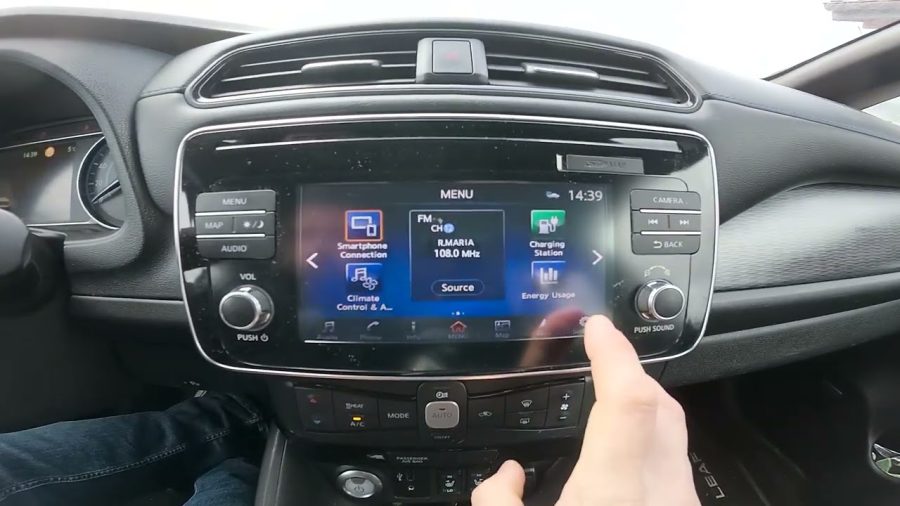
Step-by-Step: Changing the Language from Japanese to English
This procedure applies to the NissanConnect system found in most 2022 Nissan Leaf units. If your menus are in Japanese, navigate by screen position — the icons are consistent regardless of language. 1. Power on the vehicle and wait for the infotainment system to fully load. 2. Tap the Home button (house icon) on the lower navigation bar of the screen. 3. Tap the Settings icon — this is typically a gear/cog symbol, usually located at the bottom right or within the main menu. 4. Scroll down to find the General or System settings option. In Japanese, this appears as “システム設定” (Shisutemu Settei). 5. Tap Language — shown as “言語” (Gengo) in Japanese. This is usually the first or second option in the general settings list. 6. Select English from the language list. The list includes multiple languages; scroll until you find English. 7. Confirm your selection when prompted. The system will restart or refresh automatically. 8. Wait 15–30 seconds for the interface to reload in English. Once the language switches, all menu items, warning messages, and system prompts will display in English. Climate control text, audio settings, and phone menus will also update.Why the Map Still Shows Japan After Changing Language
Changing the display language does not update the navigation map. The map database is stored separately — typically on an SD card or in internal flash memory — and contains geographic data for Japan only. This means even after switching to English, the navigation system will: – Show Japanese roads and cities – Fail to locate Pakistani addresses – Display GPS coordinates without matching roads This is a common frustration for owners of JDM-imported vehicles across Pakistan. The language change fixes the interface but the map region is a completely separate database.Options for Getting Pakistani Maps on Your 2022 Nissan Leaf
Option 1: Official Nissan Map Update (Difficult in Pakistan)
Nissan Japan offers navigation map updates through its official update portal, but these updates are region-locked and designed for Japan. Getting a Pakistan-specific Nissan map update through official Nissan channels is not currently a practical option for most Pakistani owners. Nissan Pakistan does not officially support JDM-imported Leaf models.Option 2: Third-Party SD Card Map Update
Some automotive electronics shops in major Pakistani cities — particularly in Lahore, Karachi, and Islamabad — offer third-party navigation map solutions for imported Japanese vehicles. These typically involve: – Replacing or updating the navigation SD card with a modified version – Loading a compatible map format (often iGO or a similar navigation platform) onto the unit – Calibrating the GPS region settings The quality and legality of these solutions varies. Ask specifically whether the map provider supports the NissanConnect platform and test it before paying. Poorly configured SD cards can cause system errors or lock the navigation unit.Option 3: Use a Dedicated Smartphone Navigation Mount
This is the most reliable and widely used solution among Pakistani JDM-import owners. Mount your smartphone using a dashboard or vent mount and run Google Maps or Waze for navigation. Pakistan coverage on both apps is solid in urban areas, and Google Maps has been actively improving road data coverage in Lahore, Karachi, Rawalpindi, and Islamabad. The 2022 Nissan Leaf’s NissanConnect system supports Apple CarPlay and Android Auto on some variants. If your unit has this capability, you can mirror your phone’s Google Maps directly onto the car’s touchscreen — giving you Pakistani navigation on the factory display without any map modification.Checking for Apple CarPlay or Android Auto on Your JDM Leaf
Not all JDM NissanConnect units support CarPlay or Android Auto out of the box. Some Japanese-market units shipped without this feature enabled, even though the hardware supports it. After switching to English, go to Settings > Connectivity or Settings > Apple CarPlay / Android Auto to see if the option appears. If it does: – Connect your phone via USB cable – Accept the connection prompt on both phone and screen – Google Maps will launch automatically on the car display If CarPlay or Android Auto does not appear in the menu, your unit may need a firmware update to enable it, or it may simply not be supported on your specific hardware revision.What to Do If the Language Option Is Grayed Out or Missing
Some JDM units have language settings locked to Japanese. This happens when: – The unit is running older firmware that doesn’t include English – The vehicle has a region-locked infotainment system (less common on 2022 models) – The settings are protected by a dealer PIN In these cases, a firmware update may unlock additional language options. Automotive electronics shops in Pakistan familiar with Nissan imported vehicles can sometimes perform these updates using a laptop and the vehicle’s OBD2 port. If you’re exploring diagnostic tools for your Leaf, understanding OBD2 scanners with ECU programming capability can give you a better picture of what’s possible through the diagnostic interface. For deeply locked systems, professional reprogramming is the safest route rather than attempting to flash firmware from unverified sources.Practical Tips for Pakistani Owners of Imported Nissan Leafs
– Photograph the Japanese menus before changing anything. This gives you a reference if something goes wrong mid-process. – Keep the original SD card if your system uses one for maps. Store it safely before inserting any third-party replacement. – Verify the USB cable you use for CarPlay or Android Auto is a data-capable cable, not a charge-only cable. Many connection failures come down to this simple issue. – Check for NissanConnect software updates once the language is in English. The system may prompt you to update via USB or SD card after the language change. – Avoid resetting to factory defaults unless necessary — a full reset on a JDM unit sometimes reverts everything back to Japanese and can be harder to navigate the second time.Frequently Asked Questions
Q: Can I change the language on a 2022 Nissan Leaf without going to a dealership? Yes, in most cases you can change the language directly through the infotainment settings menu. The process takes under five minutes on units with the NissanConnect system. No dealer tools or codes are required. If the language option is missing or grayed out, that’s a sign of a firmware issue, which may require a dealership or auto electronics shop visit. Q: Will changing the language affect the Japanese navigation maps already installed? No. Changing the display language only affects the interface text — menus, prompts, labels, and warnings. The map database remains completely unchanged. Japanese roads and cities will still appear in the navigation app. You need a separate map update or a smartphone navigation solution to get Pakistani roads. Q: Does the 2022 Nissan Leaf JDM model support Google Maps in Pakistan? Not natively through the factory infotainment system. However, if your specific unit supports Android Auto or Apple CarPlay, you can mirror Google Maps from your phone onto the factory screen. Google Maps has reasonable coverage of major Pakistani cities and is the most practical navigation option for JDM-import owners in Pakistan. Q: Where in Pakistan can I get the navigation map changed or updated on an imported Nissan Leaf? Automotive electronics markets in Lahore (Liberty Market area, Hall Road), Karachi (Tariq Road, Orangi Town auto markets), and Islamabad (Blue Area, Faizabad) typically have shops experienced with JDM-imported vehicles. Look specifically for shops that work with Japanese navigation systems. Ask to see a working demo before committing. Q: What happens if I accidentally reset the system to factory defaults? The system will revert to Japanese language and Japanese map settings. You’ll need to repeat the language-change process from scratch, navigating the Japanese menus by position and icon layout rather than by reading the text. Taking screenshots before resetting is strongly recommended. Q: Can a JDM Nissan Leaf infotainment system be permanently converted to a Pakistan-spec system? Technically, it may be possible to replace the entire head unit with a Pakistan or global-spec Nissan infotainment unit, but this is an expensive and complex modification. Unit compatibility, wiring harness differences, and software licensing make this impractical for most owners. Smartphone-based navigation is a much more cost-effective solution. Q: Is there a risk of damaging the car’s system by updating maps with a third-party SD card? There is some risk. A poorly formatted SD card or incompatible map software can cause the navigation system to freeze, display errors, or in rare cases require a system reset. Always get this done by a reputable shop, test the navigation before leaving, and keep the original SD card as a backup.Changing the language on a JDM 2022 Nissan Leaf is straightforward once you know which icons to tap in the Japanese menus. The map situation requires a separate solution — and for most Pakistani owners, Android Auto or Apple CarPlay with Google Maps is the fastest, most reliable path to usable navigation without any risk of damaging the factory system.