BlueDriver Bluetooth Pro is the best OBD2 scanner for beginners—simple, accurate, and app-powered.
You’re driving and the check engine light pops on. Panic or peace of mind? I’ve stood in that parking lot more times than I care to admit. A good OBD2 scanner saves you time, money, and stress. It tells you what’s wrong, whether it’s serious, and what you can try before you visit a shop. For beginners, the right tool must be easy to use, reliable, and not full of confusing menus. Over years of testing scanners, I’ve narrowed the best obd2 scanner for beginners to models that balance clarity, features, and price. Read on for hands-on advice and real-world pros and cons.

BlueDriver Bluetooth Pro OBDII Scan…
[Pro OBD2 Scanner] – BlueDriver is the easiest way to scan and understand your vehicle like a professional mechanic. Read and clear your car’s trouble codes and check engine light….
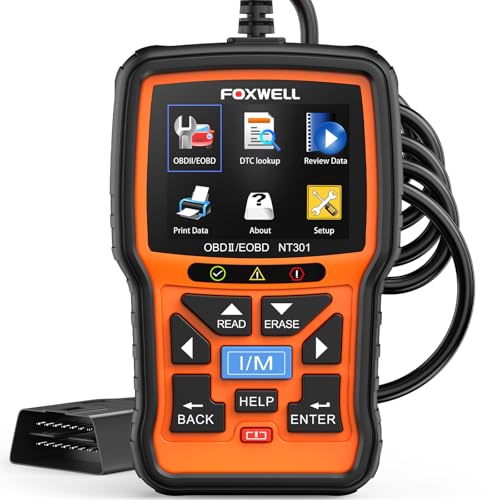
FOXWELL NT301 OBD2 Scanner Live…
[Vehicle CEL Doctor] The NT301 obd2 scanner enables you to read DTCs, access to e-missions readiness status, turn off CEL(check engine light) or MIL, reset monitor, read live data and…

OBDMATE OBD2 Scanner with ABS…
【Reset ABS/SRS/Transmission/Engine Lights】 More than an check engine code reader, OBDMATE 2025 brand new OM901 obd2 scanner performs comprehensive diagnostics for the 4 most-used systems (ABS/SRS/Engine/Transmission). It quickly clears fault…
BlueDriver Bluetooth Pro

I’ve used BlueDriver for years and it stands out for its app integration and clear diagnostics. It pairs fast with phones and reads both generic and enhanced codes. The BlueDriver app gives repair reports that even a first-timer can understand. It’s especially handy when you want guidance on what the code means and possible fixes.
On my test cars, BlueDriver identified tricky issues other cheap dongles missed. It gives live data, freeze frame, and repair reports tied to OEM information. For someone learning car diagnostics, BlueDriver bridges the gap between consumer scanners and pro-grade tools. Its ongoing app updates keep it current through 2026.
Pros:
- Clear, user-friendly app with repair reports
- Reads generic and enhanced OEM codes
- Fast Bluetooth pairing and stable connection
- Shows live data and freeze frame snapshots
- No subscription fees for core features
- Compact and highly portable
Cons:
- Relies on a smartphone—no standalone screen
- Some advanced features are limited to specific makes
- App interface can show occasional clutter for novices
My Recommendation
This is my top pick when you want the best obd2 scanner for beginners who value clear guidance. BlueDriver is best for someone who prefers working with their phone and wants reliable, near-professional results without complex hardware. I recommend it if you want fast code reads, helpful repair suggestions, and live data that’s easy to read. It gives excellent value and availability for most users interested in proactive car care.
| Best for | Why |
|---|---|
| Smartphone users | Excellent app and phone integration |
| DIY beginners | Clear repair reports and guidance |
| Value seekers | Pro-level codes without subscription |
FOXWELL NT301

The FOXWELL NT301 is a solid handheld scanner with a simple screen and buttons. I like its plug-and-play feel; you flip it on and it starts talking to your car quickly. The display shows codes, live sensor data, and readiness status. It’s one of the most straightforward dedicated scanners for people who don’t want to rely on a phone.
During road tests, NT301 performed consistently across multiple vehicles from the mid-1990s to modern models. The unit’s live data graphs helped me pinpoint intermittent issues faster. If you prefer a small, dedicated device with no extra apps, this is a practical choice as of 2026.
Pros:
- Standalone handheld device—no smartphone required
- Easy menu and clear display
- Live data and freeze frame capability
- Works well across many OBDII cars
- Durable build for garage use
Cons:
- Smaller screen than some rivals
- Limited advanced diagnostic features
- No Bluetooth connectivity for phone apps
My Recommendation
I recommend the FOXWELL NT301 to beginners who want a simple, reliable standalone tool. It’s the best obd2 scanner for beginners who prefer a physical device and want immediate readouts without pairing. It fits users doing basic diagnostics and live data checks. You’ll get straightforward value and a device that lasts in a workshop environment.
| Best for | Why |
|---|---|
| Hands-on users | Dedicated device, no phone needed |
| Quick checks | Fast boot and code reading |
| Budget-conscious | Good features at a fair price |
OBDMATE Full Scan Tool
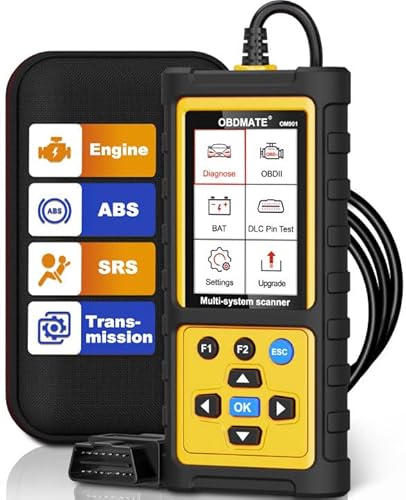
OBDMATE delivers a strong feature set at a very approachable price. I found it reads engine codes plus ABS, SRS, and transmission codes on many cars. The menu is simple, and the device includes extra tests like DLC pin check and battery voltage read. That made diagnosing charging issues much easier on older cars.
In day-to-day use, OBDMATE proved reliable and fast. It resets fault lights and verifies I/M readiness in minutes. For beginners who want more than basic engine codes, OBDMATE offers expanded coverage without a steep learning curve. It’s an excellent step up for learners seeking broader diagnostics.
Pros:
- Wide coverage: ABS, SRS, transmission in many models
- Useful extras like battery voltage and DLC pin test
- Clear menus and fast code reads
- Affordable for its capabilities
- Good build quality for the price
Cons:
- Not phone-based—no app features
- Some advanced functions can be vehicle-limited
- Screen can be small for long data lists
My Recommendation
I suggest OBDMATE for beginners who want deep basic coverage and extra tests. It’s the best obd2 scanner for beginners looking to tackle ABS and SRS alongside engine diagnostics. Choose this if you want a fuller diagnostic picture without moving into pro-level price territory. It gives strong value and real-world usefulness for learning car systems.
| Best for | Why |
|---|---|
| Multi-system checks | Reads ABS, SRS, transmission codes |
| DIY home mechanics | Extra tests help isolate issues |
| Value buyers | Feature-rich at a fair price |
VDIAGTOOL VD10 Reader

The VDIAGTOOL VD10 is a compact code reader focused on simplicity. It clears CELs, shows freeze frame data, and offers I/M readiness checks. I appreciated its quick diagnostics and the clear text descriptions of codes. This helped me avoid unnecessary trips to the shop for minor issues.
VD10 is especially useful for frequent quick checks and rental or work vehicles. It’s lightweight and easy to stash in a glove box. For beginners who want a no-nonsense tool that tells you if it’s safe to drive, VD10 is a practical pick in 2026.
Pros:
- Very compact and portable
- Simple code read and clear text descriptions
- I/M readiness and freeze frame data included
- Fast boot-up and scanning
- Affordable and easy to use
Cons:
- Limited to basic OBDII functions
- No ABS/SRS or advanced system coverage
- Small screen for longer data sets
My Recommendation
I recommend VDIAGTOOL VD10 for beginners who want a small, quick reader to handle check engine light tasks. It’s one of the best obd2 scanner for beginners when you need fast answers and a portable design. If you want a simple go-to for safety checks and quick code resets, VD10 fits well and is easy to own.
| Best for | Why |
|---|---|
| On-the-go checks | Compact and quick to use |
| Budget buyers | Very affordable basic reader |
| Safety checks | Shows I/M readiness clearly |
Innova 5210 Scanner

Innova 5210 blends user-friendly features with useful extras like a battery tester and oil reset. I use it when I want more than code reads—battery health checks matter for older cars. It pairs with Innova’s repair app for deeper diagnostics if you want phone support. The tool also aids in maintenance tasks, not just fault finding.
In tests, the Innova 5210 delivered dependable live data and I/M readiness. Its battery test avoided a misdiagnosed alternator in one older pickup I worked on. For learners who want maintenance support and code reading together, Innova provides a balanced package in 2026.
Pros:
- Battery tester and oil reset functions
- Live data and I/M readiness checks
- Bluetooth-compatible with repair app
- Good for both diagnostics and maintenance
- Durable handheld design
Cons:
- Some app features require updates
- Advanced features limited to certain vehicles
- Can feel heavier than simple code readers
My Recommendation
I recommend the Innova 5210 for beginners who want a multi-tool. It’s a top contender for the best obd2 scanner for beginners who need battery tests and maintenance tools in the same device. Choose Innova if you want a broader toolkit for upkeep and diagnostics without jumping to complex scanners.
| Best for | Why |
|---|---|
| Maintenance-minded owners | Includes battery test and oil reset |
| App users | Bluetooth compatibility with app support |
| Garage DIYers | Versatile tool for maintenance and faults |
MOTOPOWER MP69033

MOTOPOWER MP69033 targets users who want a no-frills, bright and clear device for engine fault scanning. The yellow housing stands out in a toolbox. I found its menu straightforward and its code library helpful for beginners learning what codes mean. It’s a practical, budget-friendly reader for routine checks.
In use, the MP69033 gave accurate code reads and cleared codes quickly. The device runs fast and is easy to read under sunlight. For a starter tool that stays simple and works consistently, this Motopower unit is a reliable option.
Pros:
- Bright, easy-to-spot design
- Simple menus and quick responses
- Accurate engine code reads and clears
- Affordable for basic diagnostics
- Good visibility in bright light
Cons:
- Basic feature set—no advanced systems
- Smaller display for long data lists
- No wireless connectivity
My Recommendation
I recommend the MOTOPOWER MP69033 for beginners who want a tough, no-nonsense reader. It makes a strong case as a best obd2 scanner for beginners who need reliable engine code reads without extras. Pick this if you want a bright, durable tool that gets the basics right every time. It offers simple, dependable value.
| Best for | Why |
|---|---|
| Everyday drivers | Fast, basic code reads and clears |
| Budget starters | Affordable and dependable |
| Toolbox-ready | Durable and easy to find |
ANCEL AD410

ANCEL AD410 focuses on delivering easy-to-read diagnostics with some enhanced features. I find its O2 sensor and EVAP tests practical when diagnosing emissions-related codes. The AD410 displays live data and gives I/M readiness status. It’s aimed at users who want a step up from the simplest readers.
On several cars, ANCEL’s tests helped me spot a failing oxygen sensor and an EVAP leak quickly. The device is compact and simple to navigate. For beginners wanting targeted emissions tests and clear live data, ANCEL AD410 is a solid pick in my experience.
Pros:
- O2 sensor and EVAP testing capability
- Clear live data and readiness checks
- Compact and easy to hold
- Good balance of basic and slightly advanced tests
- Affordable for added emission tests
Cons:
- Not as feature-rich as pro tools
- Advanced functions limited to certain vehicles
- No wireless connectivity
My Recommendation
I recommend ANCEL AD410 for beginners who want focused emission diagnostics. It ranks among the best obd2 scanner for beginners who care about O2 sensors and EVAP checks. Choose this unit if you want focused tests that help resolve emissions and fuel-trim problems. It’s practical and budget-friendly.
| Best for | Why |
|---|---|
| Emission-focused DIYers | Includes O2 and EVAP testing |
| Compact tool seekers | Small and easy to handle |
| Budget-conscious hobbyists | Good features for the price |
Y2 Color Graphing OBD2
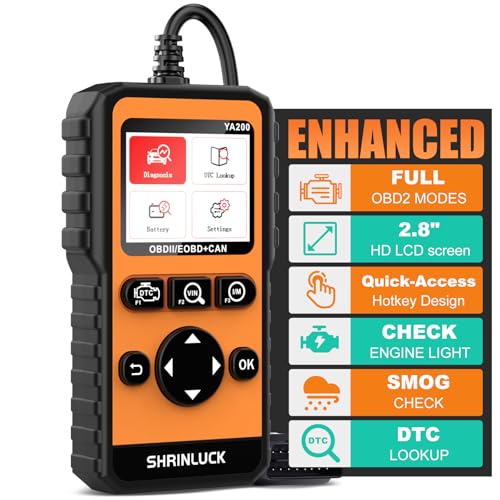
The Y2 2.8″ Color Graphing OBD2 scanner gives a modern twist on handheld scanners with a color screen and graphing live data. I found its visual graphs helpful to spot trends in sensor output. The unit supports DTC lookup and freeze frame, making it easy to read measurements at a glance. It’s great for visual learners.
In practice, Y2’s graphs helped me catch a slowly failing sensor by watching real-time trends. The color screen is bright and the menus are intuitive. For beginners who learn best by visuals, the Y2 is an appealing, modern choice in 2026.
Pros:
- Color display with live-data graphing
- Easy DTC lookup and freeze frame support
- Intuitive menus and visuals
- Helpful for spotting trends over time
- Solid balance of modern UI and functionality
Cons:
- Screen can use more battery for long sessions
- Not as many advanced functions as pro tools
- Small screen size for detailed graphs
My Recommendation
I recommend the Y2 color graphing scanner for beginners who benefit from visual data. It’s one of the best obd2 scanner for beginners if you prefer live-graph displays and quick DTC lookups. Choose Y2 to see trends and make faster, smarter troubleshooting calls. It’s modern and friendly for new users.
| Best for | Why |
|---|---|
| Visual learners | Color graphs show sensor trends |
| Trend spotting | Graphing helps catch slow failures |
| Modern-feel users | Color UI and clear DTC lookup |
FAQs Of best obd2 scanner for beginners
Do I need a smartphone to use an OBD2 scanner?
Not always. Some scanners like FOXWELL NT301 and Innova 5210 work standalone. Others, such as BlueDriver, rely on a smartphone app. Choose based on whether you prefer a physical screen or app-based diagnostics. I favor app models for richer data and repair guidance, but standalone units stay reliable and simple.
Will an OBD2 scanner tell me exact repairs?
No scanner can replace a mechanic’s hands-on inspection. Most tools report codes and likely causes. The best obd2 scanner for beginners will give clear code descriptions and suggested fixes so you can decide whether to DIY or see a pro. I use scanner reports to prioritize repairs and avoid guesswork.
Can one scanner work on all cars?
Most OBD2 scanners support vehicles sold in the U.S. since 1996. Some enhanced features depend on make and model. For full OEM-level diagnostics you may need a brand-specific tool. For general check engine codes, any of the scanners I reviewed will work on most cars through 2026.
How often should I scan my car?
I recommend scanning any time a warning light appears. For preventive care, scan before long trips or after maintenance. Regular checks every few months help catch slow issues early. A compact scanner in your glove box makes this quick and easy, and helps you stay proactive.
Final Verdict: Which Should You Buy?
For new users, I consistently recommend the BlueDriver Bluetooth Pro as the best obd2 scanner for beginners. It balances ease, depth, and helpful repair guidance through its app, making diagnostics straightforward for first-timers.
If you prefer a standalone device, FOXWELL NT301 and Innova 5210 are excellent alternatives. Each tool here earns its place depending on whether you want app features, multi-system checks, or visual data. Pick the one that fits how you work with cars.