BlueDriver is my top pick as the best obd2 scanner app for iPhone for most drivers.
You’re cruising home and the check engine light pops on. You panic for a second, then remember you can plug a small Bluetooth adapter into the car and pull codes on your iPhone. I’ve used many adapters and apps. The right app paired with a solid adapter saves time, cuts repair costs, and keeps you confident on the road.

BlueDriver Bluetooth Pro OBDII Scan…
[Pro OBD2 Scanner] – BlueDriver is the easiest way to scan and understand your vehicle like a professional mechanic. Read and clear your car’s trouble codes and check engine light….

Panlong OBD2 Scanner Bluetooth for…
【Support Android & iOS】Panlong new obd2 scanner turns your phone into a professional-grade diagnostic scan tool, allows you to monitor your car’s performance via phone in real time 【Worthy to…

FIXD Bluetooth OBD2 Scanner for…
Easily Diagnose Car Issues from Your Phone – Scan and identify 39,000+ issues across thousands of vehicles, from Check Engine lights to enhanced codes. Validate repairs or vehicle condition and…
BlueDriver Bluetooth Pro OBDII

I first used BlueDriver two years ago. The app is polished and easy on iPhone. It reads generic and manufacturer codes. It also explains probable causes and repair tips.
BlueDriver pairs quickly with its adapter. Data graphs are clear and live data is stable. I found freeze frame and smog check readiness especially useful. The app updates often and needs no subscription for core features.
Pros:
- Detailed OEM-level trouble codes and repair tips
- Fast pairing and stable Bluetooth connection
- Clear live-data graphs and logs for troubleshooting
- No recurring subscription for main features
- Good support and frequent app updates
Cons:
- Adapter costs more than generic dongles
- Some advanced features limited to certain car makes
- iPhone requires iOS app permissions for full functionality
My Recommendation
I recommend BlueDriver if you want a reliable and well-supported tool. It fits DIYers and mechanics who use iPhone daily. The blend of OEM-level codes and easy interface makes it my pick for the best obd2 scanner app for iphone. It offers solid value for long-term use.
| Best for | Why |
|---|---|
| DIY mechanics | Clear repair tips and OEM codes |
| Used-car buyers | Quick, trustable diagnostic reports |
| Regular drivers | Easy interface and no subscription |
Panlong OBD2 Bluetooth Scanner

Panlong is a budget-friendly Bluetooth OBD2 adapter that works well with a variety of iPhone apps. I found it pairs easily with common OBD apps. It reads basic codes and clears them without fuss.
The build is compact and plugs neatly under the dash. Though cheaper than premium adapters, Panlong handles basic checks well. It’s a strong pick if you want affordable diagnostics on your iPhone.
Pros:
- Very affordable for casual users
- Small, easy to store in the glovebox
- Works with many iPhone OBD apps
- Good basic code reading and clearing
- Simple pairing and use for beginners
Cons:
- Not as fast as premium adapters for live data
- Compatibility can vary across newer car models
- No advanced manufacturer data or OEM-level codes
My Recommendation
Pick Panlong if you want a no-frills, cheap dongle for occasional checks. I use it for quick checks and code clears. It’s a practical option for drivers who need the basics and want to use the best obd2 scanner app for iphone without a big expense.
| Best for | Why |
|---|---|
| Budget buyers | Low cost and decent performance |
| Occasional users | Easy setup and simple diagnostics |
| Starter kits | Great first OBD2 tool for iPhone |
FIXD Bluetooth OBD2 Scanner

FIXD focuses on clarity for non-technical users. The app translates codes into plain English. It flags severity and gives maintenance reminders.
The FIXD bundle includes a short free premium trial. I liked the clean UI and easy alerts on my iPhone. It’s ideal for drivers who want quick, friendly guidance about engine lights.
Pros:
- User-friendly code translations for beginners
- Maintenance reminders and vehicle health tips
- Good for car buying checks and routine upkeep
- Pairs reliably with iPhone and popular apps
- Compact adapter design
Cons:
- Premium features require subscription after trial
- Not aimed at professional mechanics
- Some advanced data fields are limited
My Recommendation
Choose FIXD if you want clear, non-technical guidance on your iPhone. I recommend it for parents and drivers who dislike jargon. The app’s plain English and timely alerts help you decide whether you can drive or need a mechanic. It ranks among the best obd2 scanner app for iphone for clarity and user support.
| Best for | Why |
|---|---|
| New drivers | Easy code translations and tips |
| Busy families | Simple maintenance reminders |
| Car shoppers | Quick health checks before buying |
OBDLink MX+ Bluetooth

OBDLink MX+ is built for speed and reliability. I use it for live-data logging and performance tuning on my iPhone. It supports advanced protocols and runs very stable in traffic-heavy apps.
This adapter offers security and faster data rates than many low-cost dongles. The OBDLink app gives robust live data and graphing. If you want pro-level features on an iPhone, MX+ is a top choice.
Pros:
- Very fast live-data streaming
- Supports advanced vehicle protocols
- Strong security features and stable pairing
- Good for tuning and data logging
- Works with many third-party iPhone apps
Cons:
- Higher price point than basic dongles
- Overkill for users who only clear simple codes
- Some advanced features require companion app learning
My Recommendation
I recommend OBDLink MX+ for tech-savvy drivers and hobbyists. I rely on it for fast live-data on my iPhone and accurate logging. If you want a pro-level tool, MX+ pairs well with the best obd2 scanner app for iphone and performance apps.
| Best for | Why |
|---|---|
| Performance tuners | Fast data and protocol support |
| Mobile mechanics | Reliable connectivity and security |
| Data loggers | Stable streams for long sessions |
UJS Bluetooth OBD2 Scanner
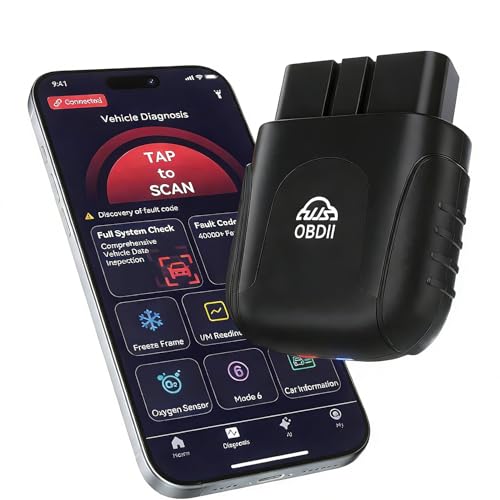
UJS advertises AI-powered diagnostics that pair with iPhone apps. I tested the adapter and found the diagnostics helpful for simple repairs. The real-time data display is clear and responsive.
AI suggestions can speed up troubleshooting. I saw useful suggestions for common faults. For drivers who want some guided help on their iPhone, UJS brings modern features to a low price.
Pros:
- AI-assisted diagnostic suggestions
- Real-time data on iPhone with clear visuals
- No subscription for core features
- Compact design and easy pairing
- Good value for modern features
Cons:
- AI suggestions can be generic
- Newer car models may need app updates
- Not as well-known as legacy brands
My Recommendation
I like UJS for drivers who want AI help and real-time data on iPhone. I found the AI suggestions quick for routine faults. If you want a modern-feeling gadget that pairs with the best obd2 scanner app for iphone, UJS is a smart, budget-savvy pick.
| Best for | Why |
|---|---|
| Modern tech fans | AI diagnostics and realtime data |
| Budget tech buyers | Good value with smart features |
| Routine troubleshooters | Quick guidance for common codes |
UJS 2026 Bluetooth Scanner
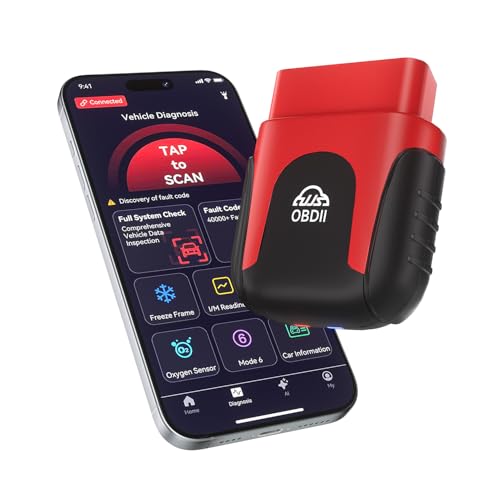
The UJS 2026 is a follow-up with refined hardware. I noticed faster response and better stability on iPhone apps. Live data updates with little lag and the AI tips are more polished.
It’s a small evolution over the earlier UJS model. I use it when I want quick checks and a calm learning curve. It pairs well with most top iPhone OBD apps and is priced fairly.
Pros:
- Improved speed and stability vs earlier models
- Friendly AI tips for drivers
- Works with many iPhone apps and utilities
- Lightweight and unobtrusive design
- No ongoing subscription for basics
Cons:
- AI still not a replacement for a mechanic
- Some advanced diagnostics require app updates
- Support resources are growing but limited
My Recommendation
I recommend the UJS 2026 for drivers who want a fast, modern adapter for iPhone diagnostics. I value the improved speed and steady data stream. For those who want the best obd2 scanner app for iphone combined with smart hardware, this is a solid choice that balances cost and features.
| Best for | Why |
|---|---|
| Frequent checkers | Faster responses and stability |
| Tech-forward users | Refined AI and app support |
| Value buyers | Good features at a fair price |
BLCKTEC 430 Bluetooth OBD2

BLCKTEC 430 is aimed at drivers who want a no-subscription, wide-protocol adapter. I found it dependable for standard engine, ABS, and SRS codes on my iPhone. The adapter is rugged and straightforward.
The app ecosystem is broad, so you can use your favorite iPhone OBD app. I liked the solid build and reliable code reads. For general maintenance and troubleshooting, BLCKTEC offers value and ease of use.
Pros:
- No subscription for main features
- Sturdy build and simple design
- Supports standard systems like ABS and SRS
- Works with many iPhone apps
- Good read and clear/reset functions
Cons:
- UI depends on third-party apps
- Limited advanced manufacturer coding
- May need occasional firmware updates
My Recommendation
I recommend BLCKTEC 430 if you want a solid, no-subscription adapter for your iPhone. I used it for routine checks and appreciated the rugged feel. If your priority is dependable, simple diagnostics, BLCKTEC is a strong contender among the best obd2 scanner app for iphone pairings.
| Best for | Why |
|---|---|
| Routine maintainers | Reliable reads and resets |
| No-subscription users | Main features work without fees |
| Hands-on owners | Durable hardware for daily use |
Generic OBD2 Bluetooth Scanner

This generic OBD2 scanner is meant for broad compatibility and simple checks. I found it useful as a backup or travel tool. It reads and clears engine codes and gives basic real-time data.
It’s a no-frills option for those who want the cheapest way to use an iPhone for diagnostics. Pairing is usually straightforward, and most free apps will connect with it. Don’t expect advanced features, but it gets the job done.
Pros:
- Very low cost and easy to replace
- Works with many free iPhone OBD apps
- Good for basic code reading and clearing
- Simple pairing and use for beginners
- Portable and compact
Cons:
- Slower live data and limited protocol support
- Quality varies between batches
- Not suited for professional diagnostics
My Recommendation
I keep a generic OBD2 Bluetooth scanner as a cheap spare for road trips. I use it with simple iPhone apps when I only need a quick read. For those testing the waters with the best obd2 scanner app for iphone options, this is a practical starter choice.
| Best for | Why |
|---|---|
| Spare tool | Cheap and handy in emergencies |
| First-time buyers | Low-risk trial and error |
| Travel kits | Compact and easy to stash |
FAQs Of best obd2 scanner app for iphone
Do I need a special adapter for iPhone?
No. Most Bluetooth OBD2 adapters work with iPhone apps. You should check compatibility and whether the adapter supports Bluetooth Low Energy for stable pairing with iOS.
Are there free apps that work well on iPhone?
Yes. Several free iPhone apps read basic codes and show live data. Paid apps add features like manufacturer codes, graphing, and logging. I often start with a free app and upgrade if I need advanced tools.
Can these tools clear the check engine light?
Yes. Most adapters and apps can clear generic and many manufacturer codes. Clearing a light doesn’t fix the root problem. I recommend diagnosing first, then clearing after repair.
Will any adapter work with newer cars after 2020?
Many do, but support varies. Newer vehicles use extended protocols. I advise checking the adapter’s specs for protocol coverage. Premium adapters tend to support the latest standards more reliably.
Is Bluetooth or Wi‑Fi better for iPhone?
Bluetooth Low Energy is usually better for iPhone. It pairs easily, uses less power, and is more stable for live data. Wi‑Fi adapters can be faster but may drain battery and need more setup.
Final Verdict: Which Should You Buy?
For most iPhone users, BlueDriver offers the best mix of clarity, OEM-level codes, and reliable pairing. Its app is polished and works well for both beginners and experienced DIYers.
If you want low cost, Panlong or generic dongles are fine. For pro-level speed and logging, OBDLink MX+ is my pick. Overall, the best obd2 scanner app for iphone depends on your needs and budget.