If your car has no working radio — whether it’s an older vehicle with a dead head unit, a classic without factory audio, or a daily driver where the stereo gave out — a Bluetooth car speaker is one of the simplest fixes available. These compact devices clip to your sun visor or mount to your dashboard, stream audio wirelessly from your phone, and handle hands-free calling without any wiring or installation. The five options below cover the most practical form factors and feature sets, so you can match the right device to how you actually drive.
As an Amazon Associate I earn from qualifying purchases.
At a Glance
- Bluetooth 5.3 for stable pairing
- TF card playback — no phone needed
- Connects two phones simultaneously
- 500mAh battery; ~3–4 hour charge
- Dual mode: induction (passive) + Bluetooth 5.3
- 5W / 100dB output — loud enough for rear passengers
- 360° rotation; fits air vent, console, or windshield
- Charges phone via included USB-A to USB-C cable
- Motion sensor: auto off/reconnect
- Dual-phone simultaneous connection
- Noise cancellation and stereo speaker
- Simple visor clip; device name T821
- Bluetooth 4.2 (older standard)
- 32GB TF card support, MP3/WMA playback
- Bass compensation system
- Lanyard included for portable carry
- 6W Hi-Fi speaker — loudest in this lineup
- Automatic multipoint Bluetooth pairing
- Auto-shutdown for battery efficiency
- Compatible with iPhone and Android
Quick Product Comparison
| Product | Bluetooth Version | Speaker Power | Mount Type | TF Card | Dual-Phone | Voice Assistant | Standout Feature |
|---|---|---|---|---|---|---|---|
| Bluetooth 5.3 Visor Clip Speaker | 5.3 | 3W | Sun visor clip | Yes | Yes | Siri & Google | BT 5.3 + TF card + 18-month warranty |
| heetipuk Phone Holder + Speaker | 5.3 | 5W / 100dB | Air vent / dash / windshield | Not specified | Not specified | Not specified | Induction (no-connection) mode; phone holder combo |
| Aigital Visor Clip Speaker | Not specified | Not specified | Sun visor clip | Not specified | Yes | Siri & Google | Motion sensor auto off/reconnect |
| TIANSHILI Visor Clip Speaker | 4.2 | 3W | Sun visor clip / portable | Yes (32GB) | Yes | Siri & Google | Bass compensation; ultra-lightweight (3.33 oz) |
| VeoPulse B-PRO 2B | Not specified | 6W | Sun visor clip | Not specified | Yes (multipoint) | Siri & Google | Highest wattage (6W); auto-shutdown |
Bluetooth 5.3 Car Speaker for Cellphone with Visor Clip, Handsfree Talking
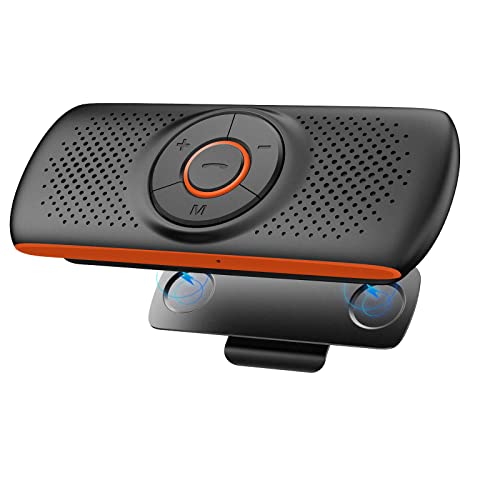
This compact visor-clip speakerphone is designed to bring hands-free calling and wireless music playback to vehicles that lack a modern head unit. It uses Bluetooth 5.3 for the wireless connection and attaches magnetically to your car’s sun visor, so there’s nothing permanent to install. The built-in TF card slot means you can even load music directly onto the device without needing a paired phone at all — a genuinely useful touch for simple use cases.
Verified Specifications
| Specification | Detail |
|---|---|
| Speaker Output | 3 Watts |
| Battery Capacity | 500 mAh |
| Charge Time | 3–4 hours |
| Claimed Battery Life | Approximately 1 week of normal use |
| Bluetooth Version | 5.3 |
| Simultaneous Phone Connections | 2 devices |
| TF Card Support | Yes (external TF/microSD card) |
| Warranty | 18 months |
Key Features and Practical Benefits
The magnetic clip-and-base system is one of the more practical mounting designs here. The speaker body snaps onto the magnetic clip mounted on the visor, so daily removal and reinstallation takes seconds — handy if you move between vehicles or share a car. The magnetic hold is described as firm enough to stay put over road bumps, yet it releases manually when you want it to.
Noise reduction and echo cancellation are built into the microphone circuit, which matters most during phone calls on highways where wind and tire noise compete with your voice. For music, the 3-watt driver is modest — appropriate for a compact visor clip device, and realistic for spoken-word content and background listening, but not a replacement for a full aftermarket speaker system.
The TF card slot is a genuine differentiator. Insert a loaded microSD card and the device plays MP3 files without any phone connection. The listing positions this as a feature for kids, but it’s equally useful if you want to keep audiobooks or podcasts playing without draining your phone’s Bluetooth radio. Voice assistant access (Siri or Google Assistant) is triggered by double-clicking the M button, keeping your eyes on the road.
Documented Advantages and Trade-Offs
The 18-month warranty is longer than most competitors at this price tier and suggests reasonable confidence from the seller. Connecting two phones simultaneously is useful for drivers who carry both a personal and a work phone. Bluetooth 5.3 is a current-generation standard, which generally means a more stable connection and lower power draw compared to older Bluetooth 4.x devices in this category.
The 3-watt output is the main limitation to understand before buying. In a quiet cabin it should be audible for both calls and music, but in a louder vehicle — an older truck with road noise or a van — you may find the maximum volume underwhelming for music playback. This is a category-wide trade-off for visor clip speakers; they prioritize portability and call quality over room-filling sound.
Who Should Consider It
This is a strong fit for drivers in older cars or trucks that have no Bluetooth head unit and want a no-wiring, no-tools solution for hands-free calls and basic music. It works equally well as a secondary speakerphone in a newer car where you simply want a dedicated device for calls without routing audio through the main stereo. The TF card feature adds appeal for anyone who prefers offline playback.
Setup and Everyday Use
Clip the magnetic base onto your sun visor, attach the speaker, then open Bluetooth settings on your phone and pair to the device. The listing confirms automatic reconnection on subsequent uses. Volume is adjusted with the +/– buttons on the unit itself. If you use the TF card for music, insert the card and playback begins automatically — no app required.
heetipuk Car Phone Holder with Bluetooth Speaker, Induction Speaker

The heetipuk takes a meaningfully different approach from a typical visor-clip speaker. It combines a full phone mount — which holds and positions your device — with a 5W Bluetooth speaker, and adds an induction (proximity) speaker mode that can amplify your phone’s audio without any wired or wireless pairing. That triple-function design makes it one of the more versatile options in this guide, particularly for older vehicles and for users who prefer minimal setup steps.
Verified Specifications
| Specification | Detail |
|---|---|
| Speaker Output | 5 Watts |
| Maximum Volume | 100 dB (claimed) |
| Bluetooth Version | 5.3 |
| Battery Life | 6 hours (full charge) |
| Charging Cable Included | USB-A to USB-C |
| Mount Rotation | 360° |
| Mount Locations | Air vent, dashboard/center console, windshield |
| Induction Mode Compatibility Note | Does not support iPhone 17 Pro or 17 Pro Max |
Key Features and Practical Benefits
The induction speaker mode is the headline feature. When your phone is clamped into the mount, the speaker picks up and amplifies the phone’s audio output acoustically — no Bluetooth pairing, no cable connection, no app. For seniors or any driver who finds Bluetooth pairing confusing or unreliable, this is a genuinely useful fallback. Navigation prompts, incoming call audio, and media all come through louder simply by virtue of the phone being seated in the holder.
The 5W Bluetooth mode delivers noticeably more output than the 3W speakers found on most visor-clip units. At a claimed 100 dB maximum, the listing suggests it’s loud enough for rear passengers to hear, which is a practical advantage in larger vehicles like minivans or SUVs. Bluetooth mode also produces better audio fidelity than induction mode, according to the product listing itself — a useful honest admission.
The phone mount function shouldn’t be overlooked. A 360° rotating arm lets you set the phone in portrait or landscape orientation, at eye level, so you aren’t glancing down at a dashboard-level screen for navigation. Three mounting options — air vent, center console, and windshield — means this will fit the vast majority of US vehicle interiors without modification.
Documented Advantages and Trade-Offs
The combination of phone holder and speaker in one unit reduces dashboard clutter compared to running a separate mount and a separate Bluetooth speaker. The included USB-A to USB-C cable means you can charge your phone through the unit while using it, provided your vehicle has a USB-A port — a practical consideration for all-day drivers. Six hours of battery life is solid for a typical commute or road trip leg, though heavy users will want to keep the unit charged between drives.
The induction feature’s limitations deserve attention. The listing explicitly states it does not support iPhone 17 Pro and 17 Pro Max, so if you or a family member has one of those models, induction mode won’t work — Bluetooth mode still will. Induction amplification is also generally less precise than a direct Bluetooth audio stream; it’s a convenience feature, not a high-fidelity one. Buyers who prioritize music quality over convenience should use Bluetooth mode.
Who Should Consider It
This is the best pick in this guide for older-car drivers who want a single device that mounts the phone, amplifies navigation and music, and doubles as a Bluetooth speaker upgrade — all without touching the dashboard wiring. It’s especially well suited for seniors or anyone who values a zero-pairing-step audio option. Families with a mix of phone types will appreciate that Bluetooth mode works universally even when induction mode doesn’t cover every device.
Setup and Everyday Use
Choose your mounting location (vent, console, or windshield), secure the arm, and clamp your phone in. For induction mode, that’s the entire setup — no further steps. For Bluetooth mode, pair your phone once through your phone’s Bluetooth settings; the device should reconnect automatically on future trips. The USB-A charging cable connects to your car’s USB port to keep both the unit and your phone powered. Adjust the arm angle once to your preferred viewing position; the listing states the lock holds position even over bumps.
Bluetooth Car Speaker, Aigital Car Bluetooth Speaker for Handsfree
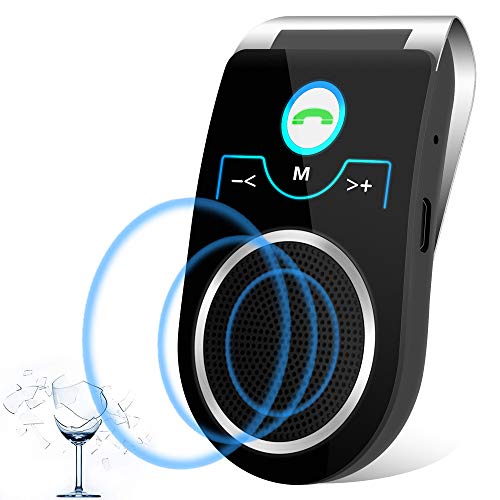
The Aigital visor-clip car Bluetooth speaker is a straightforward hands-free kit aimed at drivers whose vehicles lack any built-in audio or Bluetooth system. It clips onto the sun visor, pairs wirelessly with your phone, and handles both calls and music playback without requiring any wiring. Its standout practical feature is a built-in motion sensor that powers the unit off automatically when your phone disconnects for more than ten minutes, which helps conserve battery between drives. On reconnection, it pairs back to your previously connected device automatically, so you don’t have to go hunting through your phone’s Bluetooth menu every morning.
Verified Specifications
| Simultaneous phone connections | 2 devices |
| Voice assistant support | Siri and Google Assistant |
| Noise cancellation | Yes (listed feature) |
| Auto power-off | After 10 minutes of disconnection |
| Device name for pairing | T821 |
| Mount type | Visor clip |
Key Features and Practical Benefits
The dual-phone multipoint connection is genuinely useful for drivers who carry both a personal and a work phone. The listing describes one connection handling music while the other handles navigation audio, so you can keep both active without constantly re-pairing. Siri and Google Assistant are accessible by long-pressing the call button, which means you can launch navigation, dictate texts, or skip tracks without taking your eyes off the road.
The noise cancellation and stereo speaker combination is positioned for highway driving, where road noise is a real obstacle to clear call audio. These are listed claims rather than independently verified performance specs, but the inclusion of both features does put this unit a step above purely single-channel handsfree kits.
Documented Advantages and Trade-Offs
The auto-off and auto-reconnect cycle is a practical advantage that the competing visor-clip options in this guide don’t all match explicitly. It reduces the friction of daily use considerably. On the downside, the listing does not mention a TF/SD card slot, so unlike several competitors here, you cannot load music directly onto the device — playback depends entirely on a paired phone or streaming source. There is also no mention of battery capacity or stated battery life in hours, which makes it harder to assess how it holds up on a long road trip where you might not have a charging source nearby.
Who Should Consider It
This speaker suits commuters and errand drivers who want effortless daily reconnection without manual fuss. The auto-off sensor makes it a sensible choice if you frequently leave and re-enter your car throughout the day. It is less suited to drivers who want to load a playlist onto an SD card and leave their phone in a bag, since there is no onboard media storage.
Setup and Everyday Use
Clip the unit onto your sun visor, then open Bluetooth settings on your phone and search for “T821.” After the initial pairing, the device reconnects automatically when you start your car and your phone’s Bluetooth is on. To activate Siri or Google Assistant, long-press the call button. Volume is adjusted directly on the unit. No app installation is required.
View the Aigital Car Bluetooth Speaker on Amazon
Bluetooth Visor Clip Car Speaker
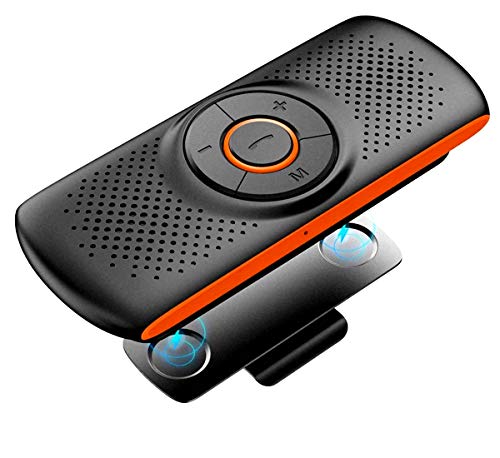
The TIANSHILI visor-clip speaker doubles as a portable Bluetooth speaker that also works outside the car, making it one of the more versatile options in this guide. It clips magnetically to the sun visor for in-car use, but at 3.33 oz with a lanyard included, it can just as easily move to a desk, a campsite, or a bag. The built-in TF card slot adds an offline music playback option that’s genuinely useful for drivers who want music running without draining phone battery or burning through mobile data.
Verified Specifications
| Speaker output | 3 watts |
| Weight | 3.33 oz |
| TF card support | Up to 32 GB (MP3/WMA formats) |
| Bluetooth version | 4.2 |
| Simultaneous phone connections | 2 devices |
| Microphone technology | DSP echo cancellation and noise reduction |
Key Features and Practical Benefits
The TF card behavior is worth highlighting: when a micro SD card is inserted, the speaker automatically prioritizes card playback over Bluetooth audio. That’s a design choice that matters — it means you can load your favorite albums or podcasts onto a card and get uninterrupted playback the moment you start the car, with no phone pairing needed. This is a real benefit for drivers who want a simple, no-fuss experience.
The DSP noise reduction microphone and bass compensation system are listed as thoughtful additions for a 3-watt speaker. For calls on a busy highway, DSP filtering helps the person on the other end hear you more clearly. The bass compensation is intended to give the small driver a fuller sound than the raw wattage would suggest, though as with all listed specs, real-world results vary by vehicle acoustics.
Documented Advantages and Trade-Offs
The portability advantage here is real and measurable — the unit’s weight and included lanyard mean it genuinely functions outside the car in a way that a dashboard-mounted or air-vent speaker cannot. The magnetic visor clip design also provides a clean, secure mounting point without adhesive. On the downside, Bluetooth 4.2 is an older standard compared to the 5.3 used in two other products in this guide. For a visor-clip speaker with short-range use, this rarely causes a practical problem, but it is worth noting if you tend to keep your phone in your back pocket or bag. There is no mention of auto power-off or motion sensor, so battery management requires manual attention.
Who Should Consider It
This is a strong fit for drivers who want a speaker they can load with offline music and forget about, particularly those with older vehicles and no data plan to spare, or anyone who commutes in areas with spotty cell coverage. It also suits anyone who wants one device that travels from car to desk to outdoor use without buying separate speakers for each setting.
Setup and Everyday Use
Clip the speaker onto the visor using the magnetic back plate. Pair via Bluetooth 4.2 from your phone’s settings menu. If you want offline playback, format a micro SD card (up to 32 GB) with MP3 or WMA files and insert it into the TF slot — the speaker will switch to card playback automatically. For voice assistants, the listing confirms Siri and Google Assistant activation. The included lanyard allows you to hang or carry the unit when not mounted in the car.
View the TIANSHILI Visor Clip Car Speaker on Amazon
VeoPulse Car Speakerphone B-PRO 2B Hands-Free kit

The VeoPulse B-PRO 2B is a sun-visor-mounted Bluetooth speakerphone aimed squarely at drivers whose cars lack a modern infotainment system. It clips onto the visor, pairs wirelessly with your phone, and handles both calls and music playback through its 6-watt speaker — a noticeably higher wattage rating than the 3-watt units common in this category. The listing emphasizes universal compatibility across iPhone and Android devices, plus an auto-shutdown feature to preserve battery life when the unit isn’t in use.
Verified Specifications
| Specification | Detail |
|---|---|
| Speaker Output | 6 watts Hi-Fi |
| Connectivity | Bluetooth with automatic multipoint connection |
| Auto-Shutdown | Yes — listed as a power-saving feature |
| Mounting Style | Sun visor clip |
| Voice Assistant | Siri and Google (OK Google) via voice commands button |
| Phone Compatibility | Any Bluetooth-enabled iPhone or Android device |
Key Features and Practical Benefits
The standout specification here is the 6W output. Most visor-clip speakerphones in this class top out at 3 watts, so the B-PRO 2B should produce a louder, fuller sound — useful on highway drives where road noise can drown out quieter units. For drivers in cars with no radio at all, volume headroom matters more than it would in a quiet home environment.
Automatic multipoint Bluetooth connection means the device remembers your phone and reconnects on its own each time you get in the car, without manual pairing steps. A dedicated voice commands button activates Siri or Google Assistant, allowing you to answer calls, request directions, or switch tracks without touching your phone — a genuinely useful safety feature rather than a marketing afterthought.
The auto-shutdown feature helps extend battery life when you park and forget the device is on, which is a practical advantage over units that drain continuously.
Documented Advantages and Trade-Offs
The higher wattage output and automatic reconnection are the clearest differentiators versus similarly priced competitors in this guide. The visor-clip design keeps the microphone close to your mouth, which generally supports clearer call quality compared to dashboard-mounted alternatives placed farther away.
However, the listing provides limited detail about battery capacity, charging time, or how many phones can be simultaneously paired via multipoint. The product data does not mention a TF/SD card slot, so offline music playback without a phone does not appear to be supported — something buyers who want that feature should note. The listing copy is also lighter on technical specifics than some competitors, which makes it harder to directly compare battery life or Bluetooth version.
Who Should Consider It
The B-PRO 2B is a strong match for drivers who prioritize louder, clearer audio on highway commutes and want a unit that reconnects automatically without fuss. It suits iPhone and Android users equally, and the voice assistant button makes it accessible for less tech-savvy drivers — the listing specifically positions it as a gift for family members of any age. Drivers who want to play music from a memory card rather than a phone will need to look elsewhere.
Setup and Everyday Use
According to the listing, setup is straightforward: clip the unit onto your sun visor, enable Bluetooth on your phone, and pair once. After that, automatic multipoint connection handles reconnection each time you start the car. To answer a call, the listing states you can simply say “Yes” aloud. The voice commands button triggers your phone’s assistant for hands-free dialing or music control. No app installation or complicated menu navigation is described, which aligns with the product’s positioning as a plug-and-play solution for older vehicles.
Detailed Buying Guide: Bluetooth Speakers for Cars Without a Radio
Shopping for the best Bluetooth speaker for a car with no radio—or a dead, missing, or non-Bluetooth head unit—is a different exercise than buying a portable speaker for the living room. You need a device that mounts safely inside a moving vehicle, handles road noise during calls, streams music reliably, and ideally charges itself without demanding a full electrical install. Here are the practical factors that separate a genuinely useful product from one that frustrates you within a week.
1. Mounting Style and Dashboard Placement
Most of the products in this category use one of two mounting approaches: a sun visor clip or a dashboard/air vent phone-holder mount. Visor-clip speakers (like the options from Aigital, TIANSHILI, and VeoPulse) sit above your line of sight and project sound downward into the cabin. They stay out of the way, but the audio can sound thin if the speaker driver is small and aimed at an angle. Dashboard and air-vent mount combos—like the heetipuk—position the speaker closer to ear level and double as a phone holder, which adds genuine value if you rely on navigation. Consider where you actually spend most of your attention while driving before choosing a mount style.
2. Speaker Wattage and Real-World Volume
Most visor-clip Bluetooth car speakers top out at 3 watts. That is enough for a quiet car at moderate speed, but highway wind noise and engine rumble at 65–70 mph can overwhelm a 3W driver. The VeoPulse B-PRO 2B lists 6W, and the heetipuk lists 5W at 100dB—both are meaningfully louder options if you regularly drive at highway speeds or in a noisy older vehicle. Wattage alone is not the whole story; speaker driver quality and cabinet design matter, but if maximum volume is a priority, favor units with at least 5–6W.
3. Noise Cancellation and Microphone Quality
A Bluetooth speaker that sounds great for music but produces muffled, wind-blasted audio during phone calls is a safety hazard, not a convenience. Look for listings that mention DSP noise reduction and echo cancellation specifically. The TIANSHILI uses DSP technology in its microphone circuit; the Aigital and the Bluetooth 5.3 visor-clip model both advertise echo cancellation. These are listing claims, not independently verified specs, but they signal the manufacturer at least engineered call quality into the design. If hands-free calling is your primary use case, prioritize microphone features over raw speaker wattage.
4. Bluetooth Version and Multi-Device Support
Bluetooth 5.x (used by the heetipuk and the Bluetooth 5.3 visor-clip speaker) offers faster pairing and a more stable connection than the older Bluetooth 4.2 found in the TIANSHILI. In practice, for short-range in-car use, you may not notice a dramatic difference in audio quality, but 5.x does reduce the chance of dropouts and reconnects faster after you re-enter the vehicle. The ability to connect two phones simultaneously—offered by the Aigital, TIANSHILI, Bluetooth 5.3 visor-clip, and VeoPulse models—is genuinely useful if you carry a personal and a work phone, or if you want navigation audio on one device and music on another.
5. Battery Life and Charging Method
All of the visor-clip options run on a built-in rechargeable battery. The Bluetooth 5.3 clip speaker specifies a 500mAh battery with roughly a week of normal use on a full charge (3–4 hour charge time). The heetipuk mount-style speaker lists 6 hours of battery life and supports pass-through charging via USB-A to USB-C while in use, which is a meaningful advantage if you drive long distances. Think about whether you want to pull the device out and charge it at home every few days, or whether you need something that can top itself up directly from your car’s USB port.
6. TF/SD Card Playback and Additional Features
If your phone battery is low or you just prefer offline playback, the TF card slot found on the Bluetooth 5.3 visor-clip speaker and the TIANSHILI (supporting up to 32GB) lets you load MP3 or WMA files and play them without pairing a phone at all. The TIANSHILI will automatically prioritize TF card playback over Bluetooth when a card is inserted—useful to know so you are not confused when music starts before you pair. Siri and Google Assistant support, present across nearly all options here, is convenient for voice-activated dialing and navigation without touching your phone.
Compatibility Check Before You Buy
These devices pair with any Bluetooth-enabled smartphone—iPhone or Android—without additional software. The heetipuk’s induction mode (no Bluetooth connection needed) is listed as incompatible with iPhone 17 Pro and 17 Pro Max, so check that caveat if you own one of those models. For vehicles with a USB-A port on the dash, the heetipuk’s charging-while-playing feature works out of the box. If your car has no USB port at all, you will need a 12V USB adapter to keep the heetipuk charged. Visor-clip models simply charge via a cable connected to any USB source; they do not need your car’s electrical system to function.
If your car’s existing audio situation is more complex—for example, you have a head unit but its speakers are cutting out—a Bluetooth clip speaker is a temporary workaround, not a fix. You can read about diagnosing car speakers that go in and out to understand whether the problem is in the head unit, wiring, or the speakers themselves before spending money on a workaround device. And if you are considering a longer-term upgrade path—replacing a missing head unit entirely—understanding DIN radio mount sizing is the right first step so you choose a replacement that actually fits your dash opening.
Installation, Assembly, and First-Time Setup
None of the products reviewed here require tools, professional installation, or any modification to your vehicle’s wiring. That is part of their appeal. Still, first-time setup goes more smoothly when you know what to expect.
Visor-clip models (Aigital, TIANSHILI, VeoPulse, Bluetooth 5.3 visor-clip): Open the clip and slide it over the fabric edge of your sun visor. Most use a magnetic back plate to keep the speaker body locked against the clip; the speaker can be removed and reattached without unclipping the mount each time. Position the speaker so it faces inward toward the cabin rather than toward the windshield—this improves both sound projection and microphone pickup. Once mounted, charge the unit fully before first use. Power it on, then open Bluetooth settings on your phone, search for the device name (for example, “T821” for the Aigital model), and tap to pair. Confirm the connection tone, then test a call and adjust volume using the physical buttons on the speaker.
Heetipuk dashboard/vent mount: Choose your preferred mounting location—air vent clip, center console base, or windshield suction—and secure the mount arm. Adjust the holder height so your phone screen sits at a comfortable eye-level angle. To use Bluetooth mode, power on the speaker and pair via your phone’s Bluetooth menu; to use induction mode, simply clamp your phone into the holder and sound transfers automatically, no pairing needed. Connect the included USB-A to USB-C cable to your car’s USB port if you want charging while driving. The 360° rotation lets you switch between landscape and portrait orientation to suit your navigation app.
TF card setup (applicable models): Format a microSD card as FAT32, load MP3 or WMA files into the root directory, and insert it into the TF card slot. The speaker should detect the card and begin playback automatically. If the card is inserted before Bluetooth pairing, card playback will take priority on the TIANSHILI—remove the card or hold the appropriate button to switch modes.
Always consult the manufacturer’s included instruction sheet, as button functions and pairing sequences can vary between firmware revisions. The above steps reflect general behavior described in the product listings and are not a substitute for the manual shipped with your specific unit.
Maintenance and Common Troubleshooting
Keeping the device clean: Wipe the speaker grille with a dry or lightly damp cloth. Avoid spraying liquids directly onto the unit, especially near the TF card slot, USB charging port, and button edges. Dust buildup on the grille fabric can noticeably muffle high frequencies over time.
Pairing issues: If the speaker does not appear in your phone’s Bluetooth scan, make sure no other device is currently connected to it—most of these units can only actively pair with new devices when in pairing mode (usually indicated by a fast-flashing LED). Hold the power or multifunction button until you hear a pairing tone. Delete the device from your phone’s saved Bluetooth list and re-pair from scratch if the connection repeatedly drops.
Echo or noise on calls: Position the speaker so the microphone faces toward you, not toward the windshield or door. Road noise entering through open windows can overwhelm even DSP-equipped mics. Reducing the speaker’s volume slightly often reduces echo feedback picked up by the microphone.
Auto-off not working as expected: The Aigital model uses a motion sensor to trigger a 10-minute auto-shutdown when the phone disconnects. If the speaker keeps powering off unexpectedly, check that your phone’s Bluetooth is not toggling off due to battery-saver settings.
Battery not holding charge: Lithium cells in small devices degrade with heat. Leaving a visor-clip speaker in a car parked in direct sunlight for extended periods will shorten battery life over time. Remove the unit from the car during hot-weather parking when possible.
TF card not recognized: Try reformatting the card as FAT32 and confirm files are MP3 or WMA format. Cards above 32GB may not be recognized by older firmware on some models.
Frequently Asked Questions
Will these speakers work in any car regardless of make or model?
Yes. All of the products reviewed here are self-contained Bluetooth speakers that clip onto a visor or mount on a dashboard. They do not connect to your car’s wiring, speaker system, or head unit. As long as your phone has Bluetooth, these devices function identically in any vehicle—old or new, foreign or domestic.
Can I use these for music as well as phone calls?
Yes. Every product listed here handles both audio streaming and hands-free calling via Bluetooth. Sound quality for music through a small 3W or 5W car speaker is adequate for background listening at moderate volumes, but these are not high-fidelity audio solutions. The VeoPulse at 6W and heetipuk at 5W/100dB offer the most headroom for music playback.
Do I need a car with a USB port to use these speakers?
Not to use them—only to charge them while driving. Visor-clip models charge via any USB source (a 12V-to-USB adapter works fine) and run on internal batteries when driving. The heetipuk specifically benefits from a USB-A port in the car because it supports simultaneous charging and use; an included cable handles this. A standard 12V car adapter with a USB-A port is widely available if your car lacks a built-in one.
What is the difference between induction mode and Bluetooth mode on the heetipuk?
In induction mode, the heetipuk picks up and amplifies the sound your phone’s own speaker produces—no wireless pairing is needed, just physical contact with the holder. This is convenient but the listing notes it does not support iPhone 17 Pro or 17 Pro Max. In Bluetooth mode, audio streams wirelessly from your phone to the speaker, producing better sound quality than induction mode, according to the product listing.
Can these speakers connect to two phones at once?
The Aigital, TIANSHILI, Bluetooth 5.3 visor-clip, and VeoPulse models all support dual-phone simultaneous connection. This is useful for managing calls from a personal and work phone, or for having navigation running on one device while music plays from another. The heetipuk listing does not specifically describe dual-phone pairing.
Is a TF card necessary to use these speakers?
No. TF (microSD) card support is an optional convenience feature. You can use all of these speakers exclusively via Bluetooth without inserting a card. TF playback is most useful when you want to play music without draining your phone’s battery, or when you are in an area with poor mobile data coverage and cannot stream.
Will my iPhone’s Siri work with these speakers?
Yes, for most models. The Bluetooth 5.3 visor-clip speaker, Aigital, and VeoPulse all specifically mention Siri activation. The TIANSHILI also lists Siri support for iPhones and Google Assistant for Android. Typically you double-click or long-press a button on the speaker to invoke the voice assistant. Note that some iPhone users have reported that their phone automatically starts playing music when Bluetooth connects—if that happens with your setup, you can find a fix by reading about why your iPhone starts playing music when it connects to a car.
How long do the batteries typically last before needing a recharge?
The Bluetooth 5.3 visor-clip speaker claims up to one week of normal use from its 500mAh battery with a 3–4 hour charge time. The heetipuk lists 6 hours of active battery life with the ability to charge while in use via USB. Battery longevity varies with volume level, call frequency, and ambient temperature; manufacturer estimates reflect light, intermittent use rather than continuous streaming.
Final Verdict
For most drivers with no working radio, a visor-clip Bluetooth speaker offers the fastest, most affordable path to hands-free calling and wireless music. The Aigital and Bluetooth 5.3 clip models are solid all-around picks for straightforward call and music use. The heetipuk stands apart if you also want a phone holder, louder playback, and the flexibility to charge while driving. The VeoPulse earns consideration for its higher wattage and straightforward auto-connect behavior. Choose based on your specific priorities—mount style, volume requirements, or TF card playback—rather than brand name alone.