Modern car infotainment systems pack a lot of features into the dashboard, and the SD card slot is one that confuses many drivers — especially when it shows up in a vehicle they’ve just purchased or leased.
An SD card slot in a car is a small memory card reader built into the infotainment system or instrument cluster. Depending on the vehicle, it stores navigation map data, enables media playback (music, audio files), or supports software updates. Some systems use a dedicated SD card that must remain inserted for the navigation system to function correctly.
What the SD Card Slot Is Actually Used For

The SD card slot in a car typically serves one or more of three purposes, and the specific function depends heavily on the make, model, and infotainment system installed.
Navigation map storage is the most common use. Many factory GPS navigation systems — particularly on vehicles from Honda, Nissan, Subaru, Mazda, and Hyundai — store their map data on an SD card rather than on internal flash memory. Without that card inserted, the navigation system either won’t launch or will display an error.
Media playback is the second use. Some vehicles allow you to load music files (MP3, FLAC, AAC) onto an SD card and play them directly through the head unit, similar to a USB flash drive. This is more common on older infotainment systems from the late 2000s through mid-2010s.
Software and firmware updates represent a third use, particularly on vehicles where dealers or owners update the infotainment system via SD card rather than over-the-air (OTA) updates.
Where the SD Card Slot Is Located

The location varies by manufacturer and model year. Common locations include:
- Inside the center console or glovebox — especially for navigation-specific SD cards that don’t need to be regularly removed
- On the face of the head unit — typically for media playback slots, where swapping cards is expected
- Behind a small door or panel on the dashboard — common on European vehicles and some Subaru, Honda, and Nissan models
- Inside the instrument cluster — rare but found on some Audi and Volkswagen vehicles for navigation data
If you’re not sure where yours is, the owner’s manual will show the exact location and explain what type of SD card the system requires.
Navigation SD Cards: What You Need to Know
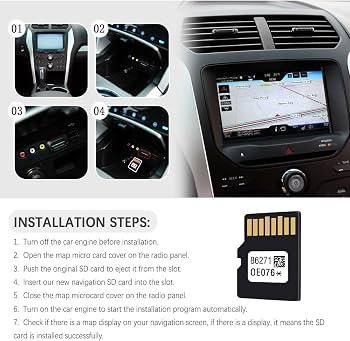
On vehicles where the SD card stores navigation maps, that card is proprietary — meaning it’s formatted and loaded by the manufacturer and can’t be easily replaced with a generic card from an electronics store.
Nissan, for example, used SD-based navigation on many models through the 2010s and early 2020s. The same applies to select Honda/Acura, Mazda, Subaru, and Mitsubishi vehicles. Losing or damaging this card can effectively disable your navigation system, and replacement cards typically need to be ordered through the dealership or an authorized map update provider.
Map data on these cards also becomes outdated. Most manufacturers release annual or biannual updates, and owners can purchase updated SD cards or download update files to refresh the existing card using a PC. The process and cost vary by brand.
Media Playback via SD Card: Compatibility and Limitations
When the SD card slot is used for music and audio, the infotainment system reads files stored on the card the same way it reads a USB drive. Supported file formats commonly include MP3, WMA, AAC, and sometimes FLAC — though FLAC support depends on the specific head unit.
Most factory systems that support SD media playback accept cards formatted in FAT32 or exFAT. Cards larger than 32GB may not be recognized by older head units, so checking the owner’s manual for the maximum supported card size and file system format is important before loading up a large card.
For better audio quality, a SanDisk Ultra SDXC UHS-I Card is a widely used option that works reliably with most vehicle head units that support SD media playback, offering fast read speeds and consistent compatibility.
Why Your SD Card Slot Might Not Be Working
A few common issues can cause the SD card slot to malfunction or fail to recognize a card.
Card not fully seated — The most frequent cause. Cards that aren’t pushed in completely until they click won’t make proper contact with the reader.
Corrupted card — If the card was removed while data was being written, or if the vehicle lost power mid-update, the card’s file system may be corrupted. In some cases, this can be repaired using a PC and disk repair tools, but navigation cards are often proprietary and harder to recover.
Wrong card format — Inserting a card that’s formatted in NTFS or a format the head unit doesn’t recognize will result in an error or no response.
Dirty or bent card contacts — Dust and debris in the slot can cause read errors. A can of compressed air is usually enough to clear debris without risk of damage.
Head unit failure — If multiple cards fail to read and the slot appears clean, the card reader itself may have a hardware fault. This typically requires professional diagnosis or head unit replacement.
Navigation SD Cards vs. USB Drives: Key Differences
| Feature | SD Card (Navigation) | SD Card (Media) | USB Drive |
|---|---|---|---|
| Main use | Stores map data | Music playback | Music, Android Auto/CarPlay |
| Removable by user | Often no | Yes | Yes |
| Proprietary format | Usually yes | No | No |
| Updateable | Yes (purchase required) | N/A | N/A |
| Max storage typical | 8–32GB | Up to 64GB+ (varies) | Up to 256GB+ (varies) |
When the Navigation Card Needs to Stay Inserted
On many vehicles that use SD-based navigation, the card is not meant to be removed during normal use. Removing it while the system is active can cause errors, and some systems require a restart to redetect the card after reinsertion.
If your navigation shows a “No Map Data” or “Navigation SD Card Not Found” error after starting the car, check whether the card is fully seated before assuming the system has failed. This is one of the most commonly reported issues with SD-based nav systems, and in most cases simply reseating the card resolves it.
Updating Map Data on Your SD Card
Navigation maps go stale over time as roads, interchanges, and points of interest change. Most manufacturers offer map updates through their websites or authorized dealers.
The update process typically involves:
- Purchasing the updated map package from the manufacturer’s map update portal
- Downloading the update files to a PC
- Copying the files to the SD card using a standard card reader
- Reinserting the card into the vehicle and following the on-screen prompts
Some brands, like Garmin and HERE (which supply maps for many OEM systems), provide these updates directly. Pricing varies widely — budget anywhere from $50 to $200 for a full map update depending on the region and manufacturer.
For those who do a lot of driving and need reliable navigation, keeping map data current significantly improves routing accuracy and travel time estimates.
Does Your Car Have an SD Card Slot? (Compatibility by Type)
Not all vehicles include an SD card slot, and whether yours does depends on the trim level, the installed infotainment system, and model year.
- Vehicles with factory navigation are the most likely to have an SD card slot — particularly mid-range and higher trims from the 2008–2022 period before cloud-connected and OTA navigation became standard
- Base trims without navigation often omit the SD slot entirely, even if higher trims include one
- Newer vehicles with Android Auto, Apple CarPlay, or built-in LTE connectivity are increasingly moving away from SD-based navigation toward internal storage or live data
- European-market vehicles, including Volkswagen, BMW, and Mercedes-Benz models, have historically used SD cards for navigation across a wide range of years and trims
Check your owner’s manual under the infotainment or navigation section to confirm whether your vehicle uses an SD card, what type it requires, and how it should be handled.
FAQ
What happens if I remove the SD card while driving?
On navigation-only SD cards, removing the card while the system is active will usually cause the navigation to stop working immediately and display an error. The vehicle itself won’t be affected — it’s purely an infotainment issue. Some systems will resume navigation if the card is reinserted and the head unit is restarted, while others require a full system reboot.
Can I use any SD card in my car, or does it need to be a specific one?
For media playback slots, most standard SD or SDHC/SDXC cards formatted in FAT32 will work, provided the card capacity doesn’t exceed the head unit’s maximum. For navigation, the card is almost always proprietary — loaded with map data by the manufacturer — and cannot be replaced with a blank card from a store without losing navigation functionality.
Why does my car’s navigation say “SD card not found” after starting?
This usually means the card isn’t fully seated in the slot. Remove the card completely, inspect the contacts for dirt or debris, and reinsert it firmly until it clicks. If the error persists with a properly seated card, the card may be corrupted or the card reader may have a fault.
How often should I update the navigation SD card maps?
Most manufacturers recommend updating map data once a year, though the practical need depends on how much road construction or new development occurs in the areas you drive most. If your system is routing you onto closed roads or missing new interchanges, it’s time for an update.
Can I use the SD card slot to play music if my car uses it for navigation?
Not on the same slot in most cases. Vehicles that use a dedicated SD card for navigation reserve that slot exclusively for map data. If you want SD-based media playback, the vehicle would need a second, separate SD card slot designated for media — which some models do include. Otherwise, a USB port or Bluetooth connection is the practical alternative for audio.
Do newer cars still use SD cards for navigation?
Increasingly, no. Vehicles released from roughly 2020 onward — especially those with built-in LTE, over-the-air updates, or cloud-connected navigation — are moving toward internal storage or live-streamed map data. However, many current vehicles still on the road use SD-based navigation, and this will remain relevant for millions of owners for years to come.
What size SD card do most car navigation systems use?
Navigation SD cards are typically 4GB to 32GB, depending on the map region and the age of the system. The manufacturer determines the size — you can’t simply swap in a larger card and expect the system to use it for navigation. For media playback slots, the maximum accepted card size varies by head unit, but 32GB is a common upper limit on older systems.
The SD card slot in your car serves a specific purpose tied directly to how your infotainment system was designed. If it’s navigation, treat that card like a critical component — keep it inserted, store the original packaging, and update maps periodically. If it’s for media playback, standard consumer SD cards formatted correctly will work reliably for most head units.