Dash cams have become one of the most popular vehicle accessories on the market, but many drivers install them without fully understanding what’s happening behind that small lens. Knowing how the technology works helps you choose the right unit and get the most out of it.
A dash cam is a compact camera that mounts to your windshield or dashboard, records continuous video while you drive, and saves footage to a memory card. It uses a wide-angle lens to capture the road ahead, a processor to compress and store video files, and loop recording to overwrite old footage automatically when storage fills up. Some models also record the cabin interior, rear view, or GPS location data.
The Core Components Inside a Dash Cam
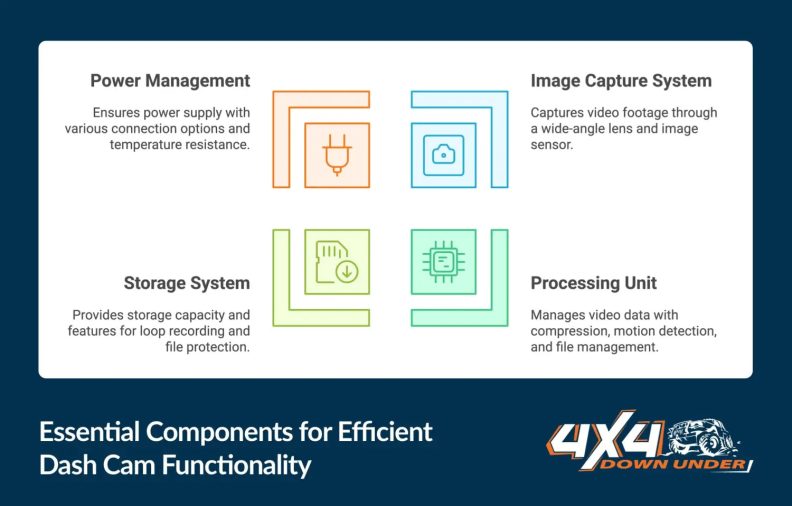
Every dash cam, regardless of price, relies on a few essential parts working together.
The lens determines how wide a field of view the camera captures. Most dash cams use a wide-angle lens ranging from 120 to 170 degrees, which is wide enough to cover multiple lanes. A larger aperture (lower f-stop number) lets in more light, which directly improves night recording quality.
Behind the lens sits the image sensor. This is either a CMOS sensor (most common) or occasionally a CCD sensor. The sensor converts incoming light into a digital signal. Sensor size and quality have a significant influence on low-light performance and overall video clarity.
The processor takes that raw sensor data, compresses it into a video file format (typically H.264 or H.265), and writes it to the storage card. A faster, more capable processor allows for higher resolution recording, smoother frame rates, and features like motion detection or lane departure alerts.
How Continuous Loop Recording Works
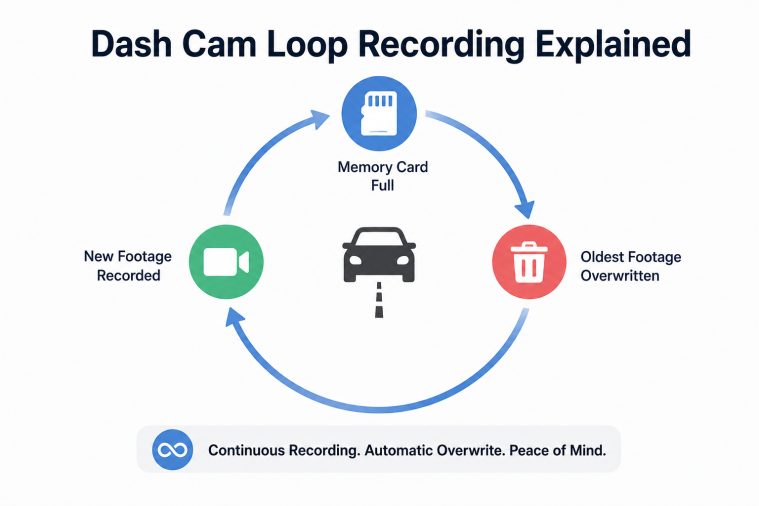
Loop recording is the foundation of how a dash cam manages storage. Rather than filling the memory card and stopping, the camera records in short clips — typically one, three, or five minutes each. When the card is full, the oldest clips are automatically deleted to make room for new footage.
This means you always have recent footage without manually managing files. However, it also means footage more than a few hours old may already be overwritten. If you’re involved in an incident, it’s important to manually lock or save the relevant clip as quickly as possible, either through the camera’s interface or a connected app.
Most dash cams include a file protection feature triggered automatically during a collision or manually with a button press. Protected files are stored in a separate folder and excluded from the loop overwrite cycle.
Power Sources: How a Dash Cam Stays On
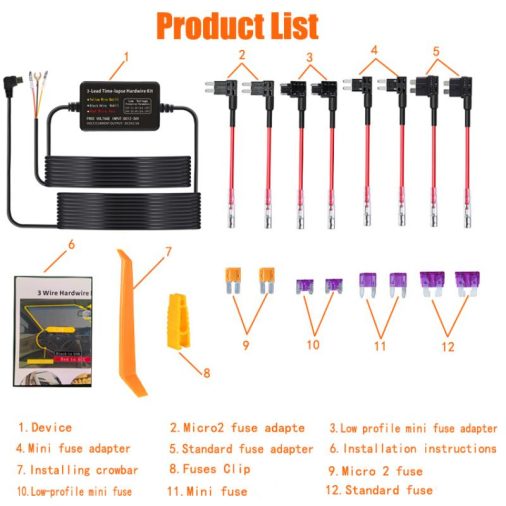
Dash cams generally run on power from your vehicle. The most common method is a 12V cigarette lighter or OBD port adapter. This powers the camera whenever the ignition is on and cuts power when the car is off.
Hardwiring kits offer a cleaner installation and allow for parking mode operation. A hardwired dash cam connects directly to a fuse in your vehicle’s fuse box, drawing low-level power even when the car is parked. In parking mode, the camera activates when it detects motion or an impact near the vehicle, recording potential incidents like parking lot collisions or vandalism.
Some cameras include a small internal supercapacitor instead of a lithium battery. Supercapacitors handle heat far better than standard batteries, making them better suited for hot climates where interior cabin temperatures can spike well above 140°F (60°C) — a condition that degrades or damages lithium cells over time.
Resolution, Frame Rate, and What They Mean in Practice
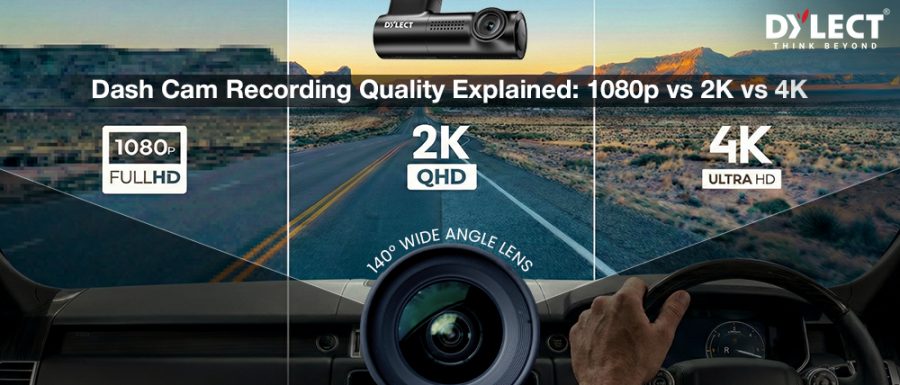
Resolution determines how much detail is captured in each frame. Common options include:
| Resolution | Pixels | Practical Use |
|---|---|---|
| 1080p (Full HD) | 1920 × 1080 | Adequate for most drivers; readable license plates in daylight |
| 1440p (2.5K) | 2560 × 1440 | Improved detail; better low-light clarity |
| 4K (Ultra HD) | 3840 × 2160 | Highest detail; larger file sizes; requires faster memory cards |
Frame rate is measured in frames per second (fps). Most dash cams record at 30fps, which is smooth enough for everyday footage. Some models offer 60fps, which captures fast-moving objects more cleanly — useful in high-speed accident reconstruction scenarios.
Higher resolution creates larger video files, which means the card fills up faster and loop recording cycles through footage more quickly. Matching the right resolution to your storage capacity matters.
GPS, Wi-Fi, and Smart Features Explained
Many modern dash cams include GPS receivers that log your speed and exact location alongside the video. This data is embedded in or stored alongside the footage file. During an accident review, GPS data can show precisely where a collision occurred, what speed the vehicle was traveling, and the direction of travel — information that can be valuable for insurance purposes.
Wi-Fi connectivity allows the dash cam to create a local hotspot that pairs with a smartphone app. This lets you preview footage, adjust settings, and download clips directly to your phone without removing the memory card. Some systems also use Bluetooth for pairing and cloud connectivity for automatic footage backup.
Higher-end models may include driver assistance features such as lane departure warnings, forward collision alerts, or speed camera notifications. These features use the camera’s processor to analyze the live video feed in real time. They’re useful reminders but should not be relied on as primary safety systems.
Front-Only vs. Multi-Channel Dash Cam Systems
A single front-facing camera covers the road ahead, which handles the majority of collision documentation needs. However, rear-end collisions — where another driver strikes you from behind — require a rear camera to capture useful footage.
Dual-channel systems pair a front camera with a rear-facing camera mounted near the back window. Both cameras record simultaneously and typically store footage on the same memory card. This configuration is a smart choice for most drivers.
Three-channel systems add an interior cabin camera, commonly used in rideshare vehicles to document passenger interactions. The interior lens typically uses infrared LEDs to record in low light without projecting visible light that would distract passengers or the driver.
Memory Cards: What Dash Cams Actually Need
Dash cams require high-endurance microSD cards designed for continuous write cycles. Standard consumer cards, including many popular photography cards, wear out quickly under the constant recording demands of a dash cam.
Look for cards rated for high-endurance use — often labeled as dashcam-specific or surveillance-grade. Common capacities range from 32GB to 256GB. As a general reference, 1080p footage consumes roughly 6–10GB per hour of recording, depending on compression settings and camera brand.
Cards should be formatted in the dash cam itself rather than on a computer to ensure compatibility with the camera’s file system. Reformatting every few months is a commonly recommended maintenance step that helps prevent file corruption and read/write errors.
Installation Basics and Vehicle Considerations
Most dash cams mount using a suction cup or adhesive mount to the upper center of the windshield, positioned behind the rearview mirror to minimize driver distraction. The camera’s power cable typically routes along the headliner and down the A-pillar to reach the 12V outlet.
In vehicles with heated windshields or embedded antenna systems in the glass, adhesion and mounting position may need adjustment to avoid interference with those systems. Large SUVs and trucks may need longer cable routing kits to reach the power source neatly.
For parking mode, a hardwiring kit requires locating a fuse that switches off with the ignition (for switched power) and a fuse that remains live when the car is off (for constant power). Fuse placement varies by vehicle make, model, and year, so consulting the specific vehicle’s fuse box diagram is necessary. If you’re not comfortable working with your vehicle’s fuse box, a professional installer can complete the hardwire connection cleanly and correctly.
FAQ
Do dash cams record when the car is off?
Standard dash cams powered through the cigarette lighter stop recording when the ignition is turned off. Dash cams with parking mode — enabled through a hardwire kit or internal battery — continue recording or activate when triggered by motion or impact detection. Without a hardwire connection or separate battery pack, the camera has no power source once the car is parked.
How long does dash cam footage last before it gets overwritten?
This depends on the camera’s resolution settings and the storage card capacity. A 64GB card recording at 1080p typically holds eight to ten hours of footage before loop recording begins overwriting the oldest files. Higher resolutions reduce this window significantly. Locking or saving important clips immediately after an incident prevents overwriting.
Can a dash cam drain my car battery?
A dash cam running in parking mode continuously draws power from the vehicle battery, which can drain it over extended periods. Most hardwire kits include a low-voltage cutoff circuit that shuts the camera down before the battery drops below a safe threshold — typically around 11.6 to 12 volts. Without this protection, overnight parking mode use can leave a vehicle unable to start.
Does resolution actually matter for reading license plates?
Resolution matters, but distance and angle matter equally. A 1080p camera can capture a license plate clearly at close range in good lighting. At greater distances, in poor lighting, or at oblique angles, even 4K footage may not reliably resolve plate characters. Positioning the camera correctly and using a model with strong night performance is often more impactful than resolution alone.
Is dash cam footage admissible as evidence?
In most jurisdictions, dash cam footage is accepted as evidence in insurance claims and legal proceedings, provided it has not been edited or tampered with. GPS timestamp data and file metadata strengthen the footage’s credibility. Legal admissibility rules vary by country and state, so checking local regulations is advisable if you plan to use footage in a formal dispute.
What’s the difference between a supercapacitor and a battery dash cam?
A supercapacitor stores less energy than a lithium battery but charges and discharges much faster and tolerates extreme temperatures far better. In hot climates, a battery-based dash cam may degrade or shut down unexpectedly as cabin temperatures climb. Supercapacitor models are generally more reliable for year-round use, particularly in regions with hot summers or very cold winters.
Do dash cams work at night?
Most modern dash cams record usable footage at night on well-lit roads. Low-light performance depends on the image sensor size, lens aperture, and whether the camera uses night-vision enhancement technology such as Sony Starvis sensors — a commonly cited benchmark for good low-light capture. Dark rural roads remain challenging for any dash cam without supplemental infrared lighting.
A dash cam works by combining a wide-angle lens, a digital image sensor, and a video processor to capture and store continuous footage on a looping memory card. Understanding loop recording, power requirements, parking mode, and memory card selection helps you get reliable footage when you actually need it. Choosing a model that fits your vehicle, climate, and driving habits matters more than chasing the highest resolution spec on the shelf.